Performance / Composition Synthesizer · Version 3.0
Section 7 — Effect Parameters (41–59 Delay/Mod)
41 STEREO DELAY + DELAY
Two independent professional quality stereo digital delays. Both FX1 and FX2 can have different Mix, Feedback, and Delay Time settings.
EFFECT MIX FX-1 (and 2) DDLRange: 00 to 99
Controls the mix between the original signal and each delay. Setting these parameters to 00 will allow only the unprocessed signal to be heard, while a setting of 99 will eliminate it completely, with only the delay portion remaining.
D-1 (and 2) REGENRange: 00 to 99
Determines the amount of signal that will be fed from the output of each delay back into the input, increasing the number of repeats in the delay.
D-1 (and 2) TIME (L and R)D-1 (L and R) Ranges: 0000 to 2000
D-2 (L and R) Ranges: 0000 to 0150
Determines the amount of time between delays. Each value increases the delay time by 1 millisecond. The Left and Right channels are independently adjustable.
42 MULTITAP DELAY
Multitap Delay produces four independent controllable delays. The EFFECT MIX FX1 and FX2 parameters can be routed into the effect with different Dry/Wet mixes. This algorithm sounds best with a mix of wet and dry.
DELAY-1 TIMERange: 0000 to 2201 msec
Sets the amount of delay time for the independent delays. Experiment with different settings to find the right mix for your sound source and application. Some interesting effects can be implemented by using a real-time modulation controller for these parameters.
LEVELRange: 00 to 99
Adjusts the volume of the delayed signals against the original dry signal. A level of 00 will offer no audible delay.
REGENRange: 00 to 99
Determines the amount of signal that will be fed from the output back into the input, increasing the number of repeats in the delays. A setting of 99 would offer an infinite delay.
PANRange: -99 to +99
Determines the location of the delays in the stereo spectrum. A value of -99 is panned far left, and +99 is far right.
| DELAY-2 TIME | DELAY-3 TIME | DELAY-4 TIME |
| LEVEL | LEVEL | LEVEL |
| REGEN | REGEN | REGEN |
| PAN | PAN | PAN |
Each of the four discrete delays has identical parameters and ranges as described above.
REGEN DAMPINGRange: 00 to 99
Controls the cutoff of a low pass filter on the feedback signal, which adjusts the amount of damping to the feedback signals. The higher the number, the more the signals are dampened.
43 EQ- -STEREO DELAYLFO
EQ- -STEREO DELAYLFO features a parametric EQ and a stereo digital delay that provides LFO modulation of a wide range of delays. This algorithm sounds great with an electric piano, but try it with any source!
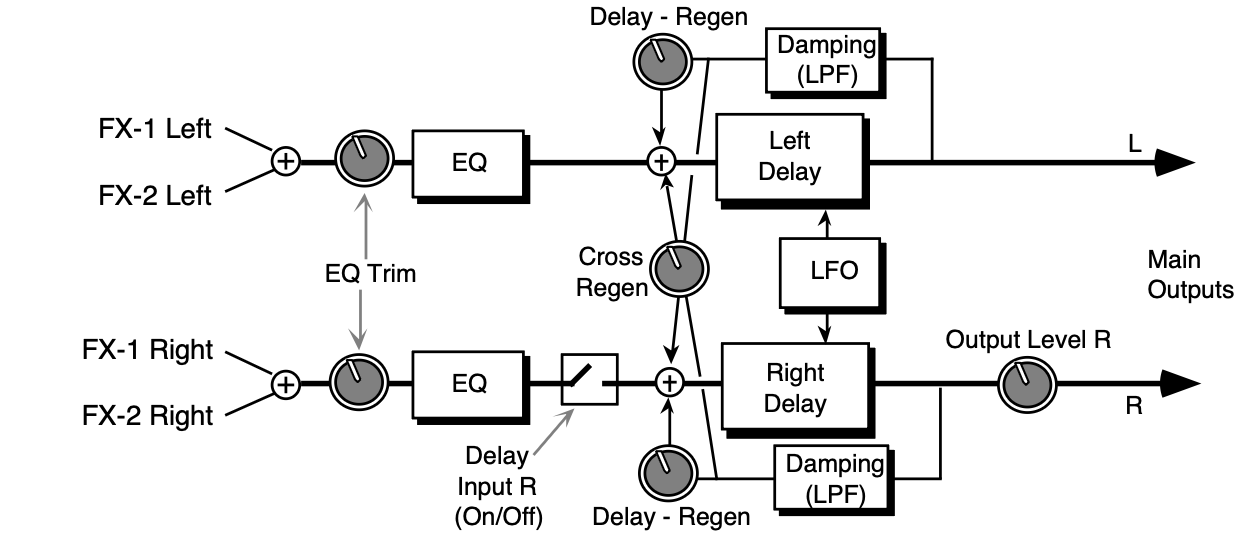
The EFFECT MIX FX1 and FX2 parameters can be routed into the effect with different Dry/Wet mixes.
LFO RATERange: 00 to 99
Controls the rate of pitch modulation which is the LFO. To achieve a chorusing effect, this rate must be very slow.
WIDTHRange: 00 to 99
Controls the excursion of pitch modulation. Since the rate is usually very slow, the width is usually large.
L/R LFORange: OUT-OF-PHASE or IN-PHASE
When this parameter is IN-PHASE, the left and right choruses will modulate their detunes together. When set to OUT-OF-PHASE, the detune on the left channel will go up while the detune on the right will go down.
DELAY INPUT RRange: OFF or ON
Disables the input into the right side delay line. The right delay line will still get input from the CROSS REGEN. This allows a ping-pong delay effect.
OUTPUT LEVEL RRange: 00 to 99
Controls the right output signal level.
DELAY - REGENRange: -99 to +99
Controls the amount of regen (regeneration) applied to the delay time taps. The sign of the value determines the polarity of the regen.
TIME LRange: 0000 to 0845 msec
Determines the amount of time between the input signal and the left delay output.
TIME RRange: 0000 to 0845 msec
Determines the amount of time between the input signal and the right delay output. Set this differently from the left delay time to achieve dotted 1/8th note type effects.
CROSS REGENRange: -99 to +99
Allows you to feedback the delayed signals to their opposite sides; the left voice crosses to the right voice, and the right voice crosses to the left voice. A setting of +99 or -99 will cause infinite delay. Be careful, if the delay regen is set too high, it may cause this parameter to “blow up.”
REGEN DAMPINGRange: 00 to 99
Adjusts the cutoff of a low pass filter on the feedback signal, which controls the amount of damping to the feedback signals. The higher the number, the more the signals are damped.
EQ TRIMRange: -24 to +00 dB
Allows you to adjust the input volume of the EQs to eliminate the possibility of clipping boosted signals.
BASS FCRange: 0000 to 1000 Hz
Sets the cutoff-frequency of the lower-frequency band shelving filter.
LEVELRange: -48 to +24 dB
Sets the amount of boost or cut applied to the low shelving filter.
TREBLE FCRange: 01KHz to 15KHz
Sets the cutoff-frequency of the high shelving filter.
LEVELRange: -48 to +24 dB
Sets the amount of boost or cut applied to the high shelving filter.
44 EIGHT VOICE CHORUS
EIGHT VOICE CHORUS offers a symphonic chorused sound having eight different voices and using eight separately randomized LFOs. This algorithm also offers a user programmable stereo delay in a cross coupled configuration between the left and right chorused outputs (see diagram).
This algorithm is good for creating an ensemble of instruments from single sources (there is no internal filtering applied to any of the chorused voices). The EFFECT MIX FX1 and FX2 CHORUS parameters can be routed into the effect with different Dry/Wet mixes. For this algorithm we recommend a mix of around 50 for a starting point.
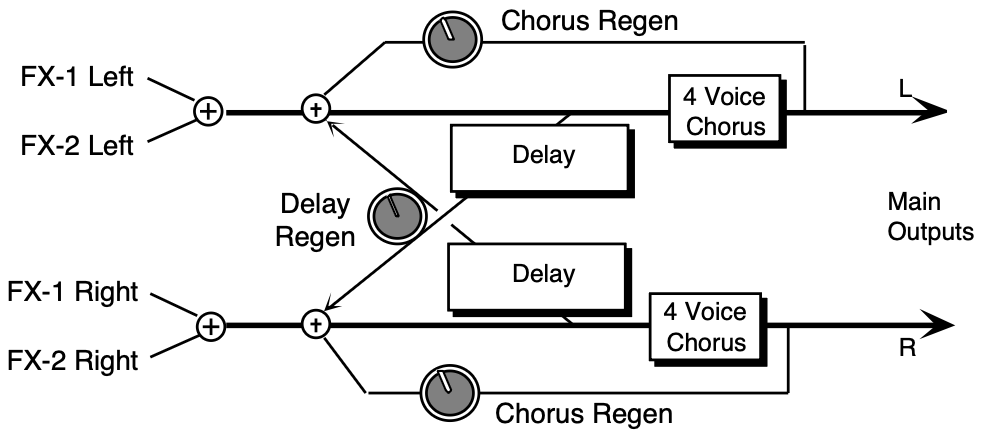
CHORUS RATERange: 00 to 99
Controls the eight ganged rates of modulation of the respective voices and produces an effect similar to both vibrato and tremolando occurring at the same time.
WIDTHRange: 00 to 99
Controls the excursion of the vibrato of all the individual voices.
REGENRange: 00 to 99
Determines the amount of signal that will be fed from the output of the chorus back into the input of the chorus. A value of 00 will eliminate the regeneration effect.
STEREO SPREADRange: 00 to 99
This parameter offers a synthesized stereo field. The highest value is true stereo, intermediate values have the left and right signals mixed on both sides, and the lowest value yields only the left input channel from the right and left outputs. This parameter, though not a stereo pan, provides some interesting stereo effects when controlled by a modulation source.
DELAY REGENRange: 00 to 99
Determines the amount of signal that will be fed from the delay output back into the chorus input, increasing the number of repeats in the delay for high values. A value of 00 will eliminate the delay effect.
TIME LRange: 0000 to 0800 ms
Controls the amount of time that the non-chorused signal will delay for the left channel.
TIME RRange: 0000 to 0800 ms
Controls the amount of time that the non-chorused signal will delay for the right channel.
45 CHORUS + REVERB 1
This effect combines a four-voice chorus with the standard reverb. Assign a voice to FX-1 to get reverb after chorus, or use FX-2 for reverb only.
CHORUS MIXRange: 00 to 99
Controls the Dry/Wet mix within the chorus itself.
RATERange: 00 to 99
Controls the four rates of modulation of the delay time of the chorus. The delay modulation produces vibrato and tremolo.
WIDTHRange: 00 to 99
Controls the depth of vibrato and tremolo.
REGENRange: -99 to +99
Controls the amount of feedback applied to the chorus. The sign of the value determines the polarity of the feedback. Feedback accentuates the complexity of the “swept” signal.
DECAY TIMERange: 0.20 to 100.0
Controls the amount of time it takes for the reverberation to decay to a low level (-60 dB) after the input signal stops.
EARLY REF LEVRange: 00 to 99
Controls the level of pre-echoes of the input signal added directly to the reverb output.
HF - DAMPINGRange: 00 to 99
Controls the rate of attenuation of high frequencies in the decay of the reverberation. As natural reverb decays, some high frequencies tend to get absorbed by the environment. Increasing the value of this parameter will filter out increasing amounts of high-frequency energy.
BANDWIDTHRange: 00 to 99
Acts as a low pass filter on the signal going into the reverb, controlling the amount of high frequencies that will pass into the effect. The higher the setting, the more high frequencies are allowed to pass.
LF DECAYRange: -99 to +99
Boosts or cuts the rate at which low frequencies will decay.
DIFFUSIONRange: 00 to 99
Determines whether the early reflections will appear as a series of discrete echoes (lower values) or will be more diffused (higher values).
DETUNE - RATERange: 00 to 99
Controls the LFO rate of detuning incorporated within the reverb. Detuning creates a slight pitch shift into the reverberated signal, giving it a more natural sounding decay by breaking up resonant nodes.
DEPTHRange: 00 to 99
Controls the depth of the detuning, that is, how much the pitch will change. Low values yield a metallic sound. Some voices sound best with very low values.
46 CHORUS + REVERB 2
This effect combines a four-voice chorus with a plate reverb, sporting superior randomization and poly-phase interpolation. Assign a voice to FX-1 to get reverb after chorus, or use FX-2 for reverb only.
CHORUS MIXRange: 00 to 99
Controls the Dry/Wet mix within the chorus itself.
RATERange: 00 to 99
Controls the four rates of modulation of the delay time of the chorus. The delay modulation produces vibrato and tremolo.
WIDTHRange: 00 to 99
Controls the depth of vibrato and tremolo.
STEREO SPREADRange: 00 to 99
This parameter offers a synthesized stereo field. The highest value is true stereo, intermediate values have the left and right signals mixed on both sides, and the lowest value yields only the left input channel from the right and left outputs. This parameter, though not a stereo pan, provides some interesting stereo effects when controlled by a modulation source.
REGENRange: -99 to +99
Controls the amount of feedback applied to the chorus. The sign of the value determines the polarity of the feedback. Feedback accentuates the complexity of the “swept” signal.
REVB DECAY TIMERange: 0.40 to 140.0
Controls the amount of time it takes for the reverberation to decay to a low level (-60 dB) after the input signal stops.
PRE-DLY TIMERange: 0000 to 0300
Creates a delay in the amount of time it takes before the original signal is fed into the reverb. The range is based in milliseconds.
HF - DAMPINGRange: 00 to 99
Controls the rate of attenuation of high frequencies in the decay of the reverberation. As natural reverb decays, some high frequencies tend to get absorbed by the environment. Increasing the value of this parameter will filter out increasing amounts of high-frequency energy.
BANDWIDTHRange: 00 to 99
Acts as a low pass filter on the signal going into the reverb, controlling the amount of high frequencies that will pass into the effect. The higher the setting, the more high frequencies are allowed to pass.
DETUNE - RATERange: 00 to 99
Controls the LFO rate of detuning incorporated within the reverb. Detuning creates a slight pitch shift into the reverberated signal, giving it a more natural sounding decay by breaking up resonant nodes.
DEPTHRange: 00 to 99
Controls the depth of the detuning, that is, how much the pitch will change. Low values yield a metallic sound. Some voices sound best with very low values.
DEFINITIONRange: 00 to 99
Controls the rate at which echo density is increased with time. Setting this parameter too high can cause the echo density to build at a rate which exceeds the decay rate.
DIFFUSIONRange: 00 to 99
These values, in series with each other, smear the input signal transients, to diffuse and smooth the sound. Lower values will cause impulse sounds to appear as a series of discrete echoes, while higher values tend to increase the smear (smoother sounding with fewer discrete echoes).
Experiment with different levels between the diffuser parameters to find the settings that are right for your source. We recommend settings of 50 for starters.
47 DDL- -CHORUS + REVRB 1
This effect algorithm is a serial version of the DDL + CHORUS + REV parallel effect, combining a digital delay with a chorus and a plate reverb. The second sub-page (not user-programmable) shows how this effect is routed:
- Voices assigned to FX1 are sent to Effect A (DDL)
- The output of Effect A is sent to Effect B (CHORUS)
- Voices assigned to FX2 are sent to a plate reverb (REV)
SENDS A- -BRange: 00 to 99
Controls the amount of Effect A (DDL) being sent into Effect B (CHORUS). A setting of 99 would yield a serial connection between Effect A and the chorus for voices sent to FX1 and panned hard left (on the Output page). A setting of 00 would offer no chorusing.
B- -REVRBRange: 00 to 99
Controls the amount of Effect B (CHORUS) being sent into the reverb. This would allow you to add reverb to voices assigned to FX1 and panned hard right. A setting of 99 would yield a serial connection between the CHORUS and the reverb for voices sent to FX1 and panned hard right (on the Output page).
A- -REVRBRange: 00 to 99
Controls the amount of Effect A (DDL) being sent into the reverb. This would allow you to add reverb to voices assigned to FX1, without having to add any chorusing.
FX2- -REVRBRange: 00 to 99
Defines how much of the voices assigned to FX2 (on the Output page) will be sent into the Reverb. This allows you to fine tune the amount of reverb coloration you want to add to your voices.
DRYRange: 00 to 99
This parameter allows you to define how much of the FX2 signal you want to completely bypass the Reverb. By setting this parameter to 99 and the FX2- -REVB parameter to 00, you can assign voices to be completely dry.
DDL MIXRange: 00 to 99
Controls the mix between the original signal and the delay. Setting this parameter to 00 will allow only the unprocessed signal to be heard, while a setting of 99 will eliminate it completely, with only the delay portion remaining.
LEVELRange: 00 to 99
Adjusts the volume of the delayed signals against the original dry signal. A level of 00 will offer no audible delay.
PANRange: -99 to +99
Determines the location of the delays in the stereo spectrum. A value of -99 is panned hard left, and +99 is hard right. If set to either hard left or hard right, the delayed signal for the opposite side is inaudible.
DDL REGEN LRange: -99 to +99
Determines the amount of signal that will be fed from the output of the left delay back into the input, increasing the number of repeats in the delay. A setting of 99 would offer an infinite delay.
DAMPINGRange: 00 to 99
Controls the cutoff of a low pass filter on the feedback signal, which adjusts the amount of damping to the feedback signals. The higher the number, the more the signals are dampened.
DELAY TIME L and RRange: 0000 to 1000 msec
Sets the amount of delay time for the independent delays. Each value increases the delay time by 1 millisecond. Experiment with different settings to find the right mix for your sound source and application. Some interesting effects can be implemented by using a real-time modulation controller for these parameters.
CHORUS MIXRange: 00 to 99
Controls the Dry/Wet mix within the chorus itself. For starters, we recommend settings of 50.
LEVELRange: 00 to 99
Adjusts the volume of the chorused signal. A level of 00 will offer no audible signal.
WET PANRange: -99 to +99
Determines the location of the chorused signal in the stereo spectrum. A value of -99 is panned hard left, and +99 is hard right.
DRY PANRange: -99 to +99
Determines the location of the dry signal in the stereo spectrum. A value of -99 is panned hard left, and +99 is hard right.
CHORUS CENTERRange: 000 to 127
Controls the nominal delay time of the chorus about which the delay modulation occurs.
Adjusting this parameter will change the tonal character of the effect. This delay time is not related to the REGEN or the DDL delays.
RATERange: 000 to 127
Controls the four rates of modulation of the delay time of the chorus. The delay modulation produces vibrato and tremolo.
WIDTHRange: 000 to 127
Controls the depth of vibrato and tremolo.
LFO SPREADRange: 000 to 128
Controls the depth of the detuning, that is, how much the pitch will change. Low values yield a metallic sound. Some voices sound best with very low values.
REGENRange: -99 to +99
Controls the amount of feedback applied to the chorus. The sign of the value determines the polarity of the feedback. Feedback accentuates the complexity of the “swept” signal.
REVERB DECAY TIMERange: 0.40 to 140.0
Controls the amount of time it takes for the reverberation to decay to a low level (-60 dB) after the input signal stops.
PRE-DLY TIMERange: 0000 to 0300 msec
This parameter creates a time delay before the original signal is fed into the reverb. The range is based in milliseconds.
HF - DAMPINGRange: 00 to 99
Controls the rate of attenuation of high frequencies in the decay of the reverberation. As natural reverb decays, some high frequencies tend to get absorbed by the environment. Increasing the value of this parameter will filter out increasing amounts of high-frequency energy.
BANDWIDTHRange: 00 to 99
Acts as a low pass filter on the signal going into the reverb, controlling the amount of high frequencies that will pass into the effect. The higher the setting, the more high frequencies are allowed to pass.
DEFINITIONRange: 00 to 99
Controls the rate at which echo density increases with time. Higher values can cause the echo density to build at a rate that exceeds the decay rate. For the best performance, try to select the highest value that works with your sound source.
DIFFUSIONRange: 00 to 99
These parameters determine whether the early reflections will appear as a series of discrete echoes (lower values) or will be more diffused (higher values).
48 DDL- -CHORUS + REVRB 2
This effect algorithm, similar to the previous algorithm, offers a different reverb. For a complete description of the SENDS, DDL, and CHORUS parameters, refer to the previous algorithm in this section.
REVERB DECAY TIMERange: 0.40 to 140.0
Controls the amount of time it takes for the reverberation to decay to a low level (-60 dB) after the input signal stops.
PRE-DLY TIMERange: 0000 to 0150 msec
This parameter creates a time delay before the original signal is fed into the reverb. The range is based in milliseconds.
HF - DAMPINGRange: 00 to 99
Controls the rate of attenuation of high frequencies in the decay of the reverberation. As natural reverb decays, some high frequencies tend to get absorbed by the environment. Increasing the value of this parameter will filter out increasing amounts of high-frequency energy.
BANDWIDTHRange: 00 to 99
Acts as a low pass filter on the signal going into the reverb, controlling the amount of high frequencies that will pass into the effect. The higher the setting, the more high frequencies are allowed to pass.
FRONT-TO-BACK LEVS (1 to 3)Range: -99 to +99
These three fields simulate the depth of the room/hall. Think of these fields as three different microphones placed at various distances within the room/hall (the first is closest to the front, the third is farthest from the front). When the range (volume) is higher for the first value, the sound appears closer to the front, whereas a higher setting for the last value appears farther from the front, suggesting a deeper (wetter) room/hall.
DEFINITIONRange: 00 to 99
Controls the rate at which echo density increases with time. Higher values can cause the echo density to build at a rate that exceeds the decay rate. For the best performance, try to select the highest value that works with your sound source.
DIFFUSIONRange: 00 to 99
These parameters determine whether the early reflections will appear as a series of discrete echoes (lower values) or will be more diffused (higher values).
49 EQ- -CHORUS + REVERB
This algorithm offers a serial version of the PARAM EQ+CHORUS+REV parallel effect. The second sub-page (not user-programmable) shows how this effect is routed:
- Voices assigned to FX1 are sent to Effect A (PARAM EQ)
- The output of Effect A is sent to Effect B (CHORUS)
- Voices assigned to FX2 are sent to the reverb (REV)
For a complete description of the SENDS parameters, refer to the DDL- -CHORUS + REVRB 1 algorithm found earlier in this section.
INPUTRange: 00 to 99
Allows you to adjust the input level trim to the EQs to eliminate the possibility of clipping boosted signals.
OUTPUTRange: 00 to 99
Adjusts the output volume after the parametric EQ. With the LEVEL, BASS LEVEL, and TREBLE LEVEL set to high values, the OUTPUT parameter could be used to create a raspy distortion effect.
PANRange: -99 to +99
Determines the location of the EQ in the stereo spectrum. A value of -99 is panned hard left, and +99 is hard right.
MID FCRange: 00000 to 15000
Sets the center of the mid-frequency parametric.
BWRange: 0 to 15K
This parameter is a bandwidth control that determines the width of the resonant peak at the midfrequency band. By lowering the value, you can produce a narrower bandwidth.
LEVELRange: -99 to +48 dB
Sets the amount of boost or cut applied to this mid-frequency parametric.
BASS LEVELRange: -99 to +48 dB
Sets the amount of boost or cut applied to a 0 to 80Hz low-shelving filter.
TREBLE LEVELRange: -99 to +48 dB
Sets the amount of boost or cut applied to a 10 to 15K high-shelving filter.
For a complete description of the remaining parameters, refer to the DDL+CHORUS+REV algorithm found earlier in this section.
50 EQ- -CHORUS + EQ- -DDL
EQ- -CHORUS + EQ- -DDL combines an EQ and a chorus, with an EQ and a digital delay. This is the industry standard chorus effect, designed with very long delays to provide a modulated detune effect. This algorithm sounds great with a guitar sound, but try it with any source!
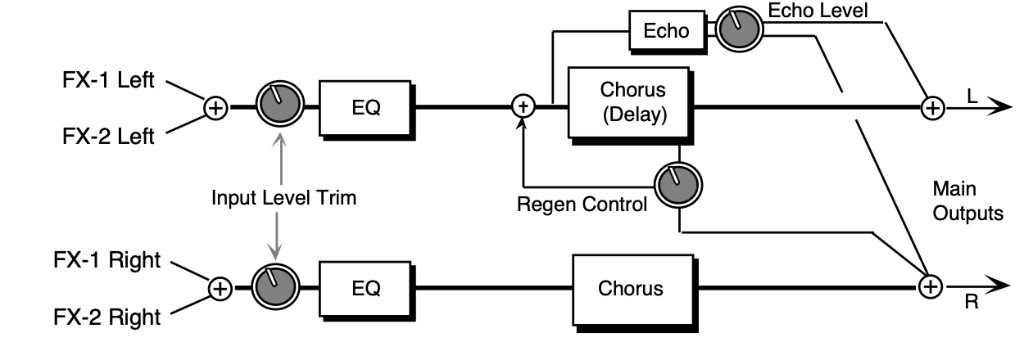
The signal enters a programmable EQ, which is preceded by an input level trim (EQ TRIM). The signal is then routed to the chorus which is heard directly at the output. There is also a delayed unchorused signal (sharing the same delay lines) that is routed back into the chorus. There is also a second signal from the delay line that is routed to the right side. There are two discrete echo times tapped out before the chorus delay line. These are unchorused echoes. The signal from the echoes is routed directly to the outputs. There is also a dry signal (not shown) that goes directly from the input to the Main Output (DRY). The EFFECT MIX FX-1 and FX-2 CHORUS parameters can be routed into the effect with different Dry/Wet mixes.
CHORUS CENTERRange: 00 to 99
Controls the nominal delay time of the chorus about which the delay modulation occurs.
Adjusting this parameter will change the tonal character of the effect. This delay time is not related to the regen delays or the echo delays.
RATERange: 00 to 99
Controls the rate of pitch modulation which is the chorus. To achieve chorusing, this rate must be very slow.
WIDTHRange: 00 to 99
Controls the excursion of pitch modulation. Since the rate is usually very slow, then the width is usually very large.
L/R LFORange: OUT-OF-PHASE
or
IN-PHASE
When this parameter is IN-PHASE, the left and right choruses will modulate their detunes together. When set to OUT-OF-PHASE, the detune on the left channel will go up while the detune on the right will go down.
DELAY - REGENRange: -99 to +99
Controls the amount of regeneration applied to the delay time taps. The sign of the value determines the polarity of the regen.
TIME (L and R)Range: 0000 to 1500 msec
These parameters control the time delay for the left and right channel regen delay, and have nothing to do with the chorus effect.
ECHO - LEVELRange: 00 to 99
Controls the volume of the discrete echo for both the left and right sides. Higher values offer louder echo, while a value of 00 will eliminate the echo. For sustained sounds, mid echo levels yield a “poor man’s reverb.”
TIME (L and R)Range: 0000 to 1500 msec
These parameters control the chorus echo time. Higher settings yield a deeper echo. There are two discrete echoes, one to the left and one to the right.
EQ TRIMRange: -24 to +00 dB
Allows you to adjust the input volume of the EQs to eliminate the possibility of clipping boosted signals.
BASS FCRange: 0000 to 1000 Hz
Sets the cutoff-frequency of the lower-frequency band shelving filter.
LEVELRange: -48 to +24 dB
Sets the amount of boost or cut applied to the low shelving filter.
TREBLE FCRange: 01KHz to 15KHz
Sets the cutoff-frequency of the high shelving filter.
LEVELRange: -48 to +24 dB
Sets the amount of boost or cut applied to the high shelving filter.
51 FLANGER + REVERB
The FLANGER + REVERB algorithm is similar to the CHORUS + REVERB algorithm with a single LFO. Assign a voice to FX-1 to get reverb after flange, or use FX-2 for reverb only.
FLANGER CENTERRange: 00 to 99
Controls the center of the flanger width.
RATERange: 00 to 99
Controls the rate of modulation of the flanger effect.
WIDTHRange: 00 to 99
Controls the range of the high to low-frequency sweep in the flanger effect.
REGENRange: -99 to +99
Controls the amount of feedback applied to the flanger. The sign of the value determines the polarity of the feedback.
DEPTHRange: 00 to 99
Controls the depth of the notches created by the flanging effect.
DECAY TIMERange: 0.20 to 100.0
Controls the amount of time it takes for the reverberation to decay to a low level (-60 dB) after the input signal stops.
EARLY REF LEVRange: 00 to 99
Controls the level of pre-echoes of the input signal added directly to the reverb output.
HF - DAMPINGRange: 00 to 99
Controls the rate of attenuation of high frequencies in the decay of the reverberation. As natural reverb decays, some high frequencies tend to get absorbed by the environment. Increasing the value of this parameter will filter out increasing amounts of high-frequency energy.
BANDWIDTHRange: 00 to 99
Acts as a low pass filter on the signal going into the reverb, controlling the amount of high frequencies that will pass into the effect. The higher the setting, the more high frequencies are allowed to pass.
LF DECAYRange: -99 to +99
This control will boost or cut the rate at which low frequencies will decay.
DIFFUSIONRange: 00 to 99
Determines whether the early reflections will appear as a series of discrete echoes (lower values) or will be more diffused (higher values).
DETUNE - RATERange: 00 to 99
Controls the LFO rate of detuning incorporated within the reverb. Detuning creates a slight pitch shift into the reverberated signal, giving it a more natural sounding decay by breaking up resonant nodes.
DEPTHRange: 00 to 99
Controls the depth of the detuning, that is, how much the pitch will change. Low values yield a metallic sound. Some voices sound best with very low values.
52 EQ- -FLANGER + DELAY
EQ- -FLANGER + DELAY combines an EQ and a flanger, and a digital delay. Use flanging to get that “jet aircraft woosh” effect.
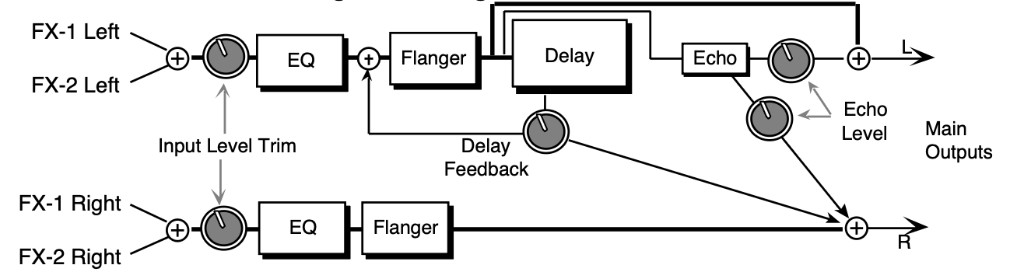
In this algorithm the signal enters an input level trim (EQ TRIM) followed by a programmable EQ, and then is routed to the flanger. The flanger is routed directly to the output. The left channel signal passes through the delay and is routed back into the flanger. Another signal from the delay is routed to the output on the right side. The DELAY - REGEN parameter controls both delay levels. There are two discrete echoes that are sent to the left and right outputs respectively.
The signal from both echoes has one level control (ECHO - LEVEL). There is also an external dry signal (not shown) that goes directly from the input to the Main Output (DRY). The EFFECT MIX FX-1 and FX-2 parameters can be routed into the effect with different Dry/Wet mixes.
FLANGE CENTERRange: 00 to 99
Controls the sweep center of the flanger effect. The larger the flanger center, the wider will be the available width.
RATERange: 00 to 99
Controls the rate of modulation of the flanger effect.
WIDTHRange: 00 to 99
Controls the range of the high to low-frequency sweep in the flanger effect.
REGENRange: -99 to +99
Controls the amount of feedback applied from the output to the flanger input. The sign of the value determines the polarity of the feedback.
NOTCH DEPTHRange: -99 to +99
Controls the depth of the notches created by the flanging effect. A setting of +00 will disable the flanging effect. A setting of +00 will also provide a doppler effect for wide moderately slow LFO rates.
S/H RATERange: 000 to 100
Controls the sample rate of a sample and hold network. This is applied to the LFO within the flanger. When in hold, the effect will be to create momentarily fixed notches within thefrequency spectrum (if the notch depth is not +00). A setting of 001 will have the largest space between samples. Higher values will increase the number of holds per second, making the flanging flow more smoothly. The sample and hold function can be turned off (when set to 000).
L/R LFORange: OUT-OF-PHASE
or
IN-PHASE
Determines whether the flanger on the left and right channels is modulating IN-PHASE or OUT-OF-PHASE.
DELAY - REGENRange: -99 to +99
Controls the level of the delay time taps. The sign of the value determines the polarity of the feedback.
TIME (L and R)Range: 0000 to 1500 msec
These parameters control the time delay for the left and right channel regen delays. The left is the “ping,” and the right is the “pong.”
ECHO - LEVELRange: 00 to 99
Controls the volume of the discrete echoes for both the left and right sides. A setting of 00 would eliminate any audible echo.
TIME (L and R)Range: 0000 to 1500 msec
These parameters control the flanger echo times for the left and right sides. Higher values yield a deeper echo.
EQ TRIMRange: -24 to +00 dB
Allows you to adjust the input volume of the EQs to eliminate the possibility of clipping boosted signals.
BASS FCRange: 0000 to 1000 Hz
Sets the cutoff-frequency of the lower-frequency band shelving filter.
LEVELRange: -48 to +24 dB
Sets the amount of boost or cut applied to the low shelving filter.
TREBLE FCRange: 01KHz to 15KHz
Selects the cutoff of the upper-frequency band high shelving filter.
LEVELRange: -48 to +24 dB
Sets the amount of boost or cut applied to the high shelving filter.
53 PHASER + REVERB
A 12-pole phase shifter with reverb. Assign a sound to FX-1 for reverb after phase, to FX-2 for just reverb, or to DRY to bypass the effect.
PHASER CENTERRange: 00 to 99
Controls the center of the phaser width.
RATERange: 00 to 99
Controls the rate of modulation of the phaser poles.
WIDTHRange: 00 to 99
Controls the amount of modulation applied to phaser poles.
REGENRange: -99 to +99
Controls the amount of feedback applied to the phaser. The sign of the value determines the polarity of the feedback.
DEPTHRange: 00 to 99
Controls the depth of the notches created by the phasing.
DECAY TIMERange: 0.20 to 100.0
Controls the amount of time it takes for the reverberation to decay to a low level (-60 dB) after the input signal stops.
EARLY REF LEVRange: 00 to 99
Controls the level of pre-echoes of the input signal added directly to the reverb output.
HF - DAMPINGRange: 00 to 99
Controls the rate of attenuation of high frequencies in the decay of the reverberation. As natural reverb decays, some high frequencies tend to get absorbed by the environment. Increasing the value of this parameter will filter out increasing amounts of high-frequency energy.
BANDWIDTHRange: 00 to 99
Acts as a low pass filter on the signal going into the reverb, controlling the amount of high frequencies that will pass into the effect. The higher the setting, the more high frequencies are allowed to pass.
LF DECAYRange: -99 to +99
Boosts or cuts the rate at which low frequencies will decay.
DIFFUSIONRange: 00 to 99
Determines whether the early reflections will appear as a series of discrete echoes (lower values) or will be more diffused (higher values).
DETUNE - RATERange: 00 to 99
Controls the LFO rate of detuning incorporated within the reverb. Detuning creates a slight pitch shift into the reverberated signal, giving it a more natural sounding decay by breaking up resonant nodes.
DEPTHRange: 00 to 99
Controls the depth of the detuning, that is, how much the pitch will change. Low values yield a metallic sound. Some voices sound best with very low values.
54 PHASER + DELAY
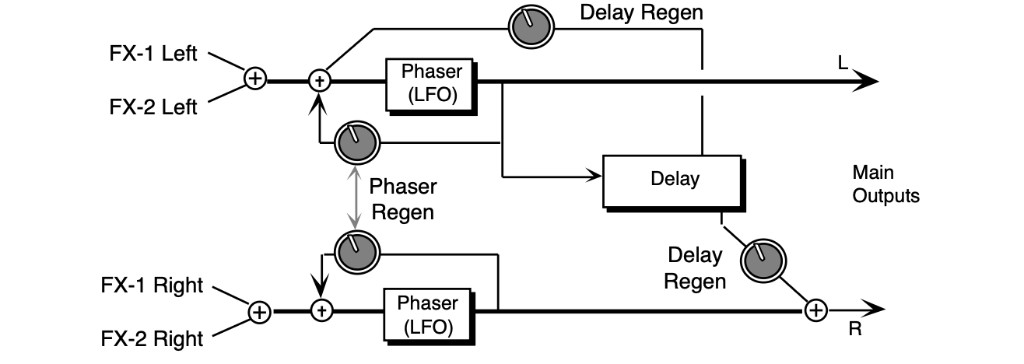
PHASER + DELAY combines a phaser with a digital delay. The phaser creates non-harmonically spaced moving notches in the signal spectrum, whereas a flanger creates harmonic spacing. This phaser implements a stereo twelve pole phasing network to achieve time delay which is a function of-frequency; this is what differentiates the phaser from the flanger. The phasing effect is achieved within the phaser topology, so it does not depend upon the external mix. A delay is included at the left output of the phaser that feeds back into the phaser (see the diagram). Setting the phaser REGEN parameter (shown at the knobs) to 00 will disable this delay function. The
DELAY REGEN also controls the delay feed forward level of another tap sent to the right channel. This delay topology achieves a 1.5 second ping-pong effect, and is very effective as a “poor man’s reverb.” The FX-1 and FX-2 parameters can be routed into the effect with different Dry/Wet mixes.
PHASER CENTERRange: -99 to +99
Controls the phaser pole center. High values raise the nominal spectral location of the “woosh” sound, while low values lower the “woosh.” The range from high to low is controlled with the phaser width.
RATERange: 00 to 99
The LFO is within the phaser network. This parameter controls the rate of modulation of the phaser poles. The higher the value the faster the rate. Lower values work best with sustained signals.
WIDTHRange: 00 to 99
Controls the width of the notch excursion. For large excursions set this parameter to 99. Doing so can give a very high “woosh” and a very low “woosh.”
REGENRange: -99 to +99
Controls the amount of feedback applied to the left and right channel phaser. The sign of the value determines the polarity of the feedback.
NOTCH DEPTHRange: -99 to +99
Controls the depth of the notches created by the phasing. Deep notches occur in the phased spectrum when the parameter is set to 99. When this parameter is set to +00, there exists no phasing (i.e. notches), but there is a doppler effect with higher phase rates.
S/H RATERange: 000 to 100
Controls the sample rate of a sample and hold network applied to the LFO within the phaser.
When in hold, the effect will be to create momentarily fixed notches within the-frequency spectrum (if the notch depth is not +00). A setting of 001 will have the largest space between samples. Higher values will increase the number of holds per second, making the phasing flow more smoothly. The sample and hold function can be turned off (when set to 000).
L/R LFORange: OUT-OF-PHASE
or
IN-PHASE
Determines whether the phaser on the left and right channels is modulating IN-PHASE or OUT-OF-PHASE.
REGENRange: -99 to +99
Controls the feedback amount for the delay effect. The sign of the value determines the polarity of the feedback. A value of +00 will eliminate the delay effect. This parameter also controls the feed forward level.
TIME LRange: 0000 to 1600 msec
This parameter sets the delay time for the left side. This is the “ping.”
DLY TIME RRange: 0000 to 1600 msec
Controls the feed forward delay time for the right side. This is the “pong.”
55 EQ- -TREMOLO + DELAY
EQ- -TREMOLO + DELAY combines an EQ and a tremolo effect, which is a pulsating change in volume, with a digital delay.
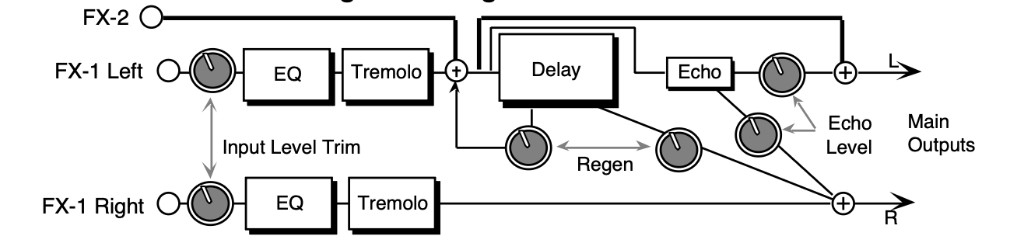
The signal enters an input level trim (EQ TRIM) followed by a programmable EQ, and is then routed to the tremolo. The tremolo is routed directly to the output. The left channel signal passes through the digital delay and is routed back into the delay. There is another signal from the delay that is routed to the output on the right side. One regen parameter (DELAY - REGEN) between the delay sends controls the left and right delay level. This constitutes the “ping-pong” effect. There are two echoes that are sent to the left and right outputs respectively. The signal from the two discrete echoes has one level control. There is also an external Dry signal (not shown) that goes directly from the input to the output. The EFFECT MIX FX-1 POST-DDL and FX-2 DDL parameters can be routed into the effect with different Dry/Wet mixes.
TREMOLO RATERange: 000 to 130
Sets the rate of modulation. Mid values create a faster wavering sound. When used in conjunction with the S/H RATE parameter it can create some interesting staccato effects.
DEPTHRange: 00 to 99
Sets the depth of amplitude modulation.
S/H RATERange: 000 to 100
Controls the sample rate of a sample and hold network applied to the LFO within the tremolo.
When in “Hold,” the effect will be to fix the instantaneous amplitude (if the depth is not 00). A setting of 001 will have the largest space between holds. Lower settings create a staccato effect, whereas higher values will increase the amount of samples, making the tremolo flow more smoothly. This parameter can also be turned off (when set to 000).
L/R LFORange: OUT-OF-PHASE
or
IN-PHASE
Controls whether the left and right channels of the stereo tremolo will modulate IN-PHASE or OUT-OF-PHASE.
DELAY - REGENRange: -99 to +99
Controls the amount of regen applied to the delay time taps. The sign of the value determines the polarity of the regen. A value of +00 will eliminate the audible delay.
TIME (L and R)Range: 0000 to 1500 msec
These parameters control the time delays for the left and right channel regen delays, and has nothing to do with the tremolo effect.
ECHO - LEVELRange: 00 to 99
Controls the volume of the discrete echo for both the left and right sides.
TIME (L and R)Range: 0000 to 1500 msec
These parameters control the tremolo echo times for the left and right side. Higher settings yield a deeper echo.
EQ TRIMRange: -24 to +0 dB
Allows you to adjust the input volume of the EQs to eliminate the possibility of clipping boosted signals.
BASS FCRange: 0000 to 1000 Hz
Selects the cutoff-frequency of the lower-frequency band shelving filter.
LEVELRange: -48 to +24 dB
Sets the amount of boost or cut applied to the low shelving filter.
TREBLE FCRange: 01KHz to 15KHz
Selects the cutoff-frequency of the upper-frequency band high shelving filter.
LEVELRange: -48 to +24 dB
Sets the amount of boost or cut applied to the high shelving filter.
56 EQ- -VIBRATO + DELAY
EQ- -VIBRATO + DELAY combines an EQ and a vibrato effect (a pitch shifter modulating over a very small range), with a digital delay. Many vintage guitar amplifiers offered a vibrato control, but don’t feel that this effect is limited to guitar sounds, try this with other sources as well. There is a sample & hold parameter that doesn’t hold the instantaneous pitch shift, but if set properly will provide a “chirping” effect when acting on the input signal.
The signal enters a programmable EQ, which is preceded by an input level trim (EQ TRIM). The signal is then routed to the vibrato. The vibrato is routed directly to the output. The vibrato also passes through the delay which is then regenerated back into the delay. A different delay signal is routed to the output on the right side. This constitutes a “ping-pong” delay effect. The delay REGEN parameter between the delay sends controls the delay feedback amount. There are also two echoes that are sent to the left and right outputs respectively. The signal from the two echoes has one level control. There is also an external dry signal (not shown) that goes directly from the input to the Main Output (DRY). The EFFECT MIX FX-1 and FX-2 VIBRATO parameters can be routed into the effect with different Dry/Wet mixes.
VIBRATO RATERange: 00 to 99
Sets the amount of modulation. Higher values create a faster vibrating rate.
WIDTHRange: 00 to 99
This parameter sets the width (adjusts the amount) of the modulation.
S/H RATERange: 000 to 100
Controls the sample rate of a sample and hold network. This is applied to the LFO within the vibrato. When in hold (low values), it causes rhythmic chirps in the pitch of the audio signal.
Higher values will increase the number of holds per second, making the vibrato flow more smoothly. The sample and hold function is turned off when set to 000.
L/R LFORange: OUT-OF-PHASE
or
IN-PHASE
Controls the vibrato pitch direction of the left and right channels. When OUT-OF-PHASE, the quadrature pitch change on the left channel will lag 90˚ from the right. When IN-PHASE, both channels will change pitch together.
DELAY - REGENRange: -99 to +99
Controls the amount of positive or negative feedback applied to the regenerated delay. The sign of the value determines the polarity of the feedback. A value of +00 will eliminate any feedback.
Controls both left and right levels.
TIME LRange: 0000 to 1500 msec
Controls the time delay on the left regenerated delay.
TIME RRange: 0000 to 1500 msec
Controls the time delay on the right non regenerated delay.
ECHO - LEVELRange: 00 to 99
Controls the volume of the discrete echo for both the left and right sides. A setting of 00 will eliminate any audible echo.
TIME (L and R)Range: 0000 to 1500 msec
These parameters control the echo times for the left and right sides. Higher settings yield a deeper echo. There are two discrete echoes, one to the left and one to the right.
EQ TRIMRange: -24 to +0 dB
Allows you to adjust the input volume before the EQs to eliminate the possibility of clipping boosted signals.
BASS FCRange: 0000 to 1000 Hz
This parameter selects the cutoff-frequency of the low shelving filter.
LEVELRange: -48 to +24 dB
Sets the amount of boost or cut applied to the low shelving filter.
TREBLE FCRange: 01KHz to 15KHz
Selects the cutoff of the upper-frequency band high shelving filter.
LEVELRange: -48 to +24 dB
Sets the amount of boost or cut applied to the high shelving filter.
57 PITCH SHIFTER
The Pitch Shifters allow you to change the pitch of a signal to any pitch desired within a range of one octave in either direction. The TS‑10 offers three different pitch shift algorithms, each designed with a different purpose:
- PITCH SHIFTER offers a splicer type pitch shifter.
- FAST PITCH SHIFTER is a pitch shifter designed for pitch correction.
- PITCH SHIFTER + DELAY combines a pitch shifter with a DDL (described later).
These algorithms sound best with an Effect Mix of wet and dry. You can assign a modulation controller for the Effect Mix parameters to bring in or fade out the pitch shifted signal. Try the different pitch shifters until you find the one that works best with your sound source, and for your application. This first algorithm is a “splicer type” of pitch shifter, which means that it drops or adds small sections of the original signal to the effect. PITCH SHIFTER does not incorporate zero crossing detection. This pitch shifter is best used for a doubling effect. Splicer type pitch shifters are popular because for low pitch shift ratios, splicing is infrequent. These pitch shifters can create very interesting stereo fields by panning each of two pitch shifted voices selectively, and because of the inherent time delay modulation of the algorithm. The FX-1 and FX-2 parameters can be routed into the effect with different Dry/Wet mixes.
VOICE-1 SEMIRange: -12 to +12
Allows you to adjust the pitch of Voice-1 to an octave above or below the original pitch in semitones (half steps).
FINERange: -99 to +99
Lets you to fine tune the pitch of Voice-1.
LEVELRange: 00 to 99
Allows you to adjust the level of Voice-1. A setting of 00 would eliminate any audible pitch shift.
PANRange: -99 to +99
Allows you to assign the location of Voice-1 in the stereo field. A value of -99 would be far left, and +99 would be far right.
| VOICE-2 SEMI | LEVEL |
| FINE | PAN |
These parameters are identical to the VOICE-1 parameters, and allow you to define a second voice for independent pitch shifting.
PITCH SHIFTER - QUALITYRange: LONG/SMOOTH or SHORT/COARSE
Allows you to choose between a long/smooth setting, or a short/coarse setting. A smooth setting would sound best with slower sustaining chords, whereas a coarse setting would enhance a rapidly played musical passage. Depending on your sound source and musical needs, set this parameter accordingly. This parameter actually controls the effect transport delay; smooth yields a long transport delay, coarse yields a short transport delay.
LFO - RATERange: 00 to 99
Controls the rate of pitch modulation that creates a chorusing effect. To achieve chorusing, this rate must be very low.
WIDTHRange: 00 to 99
Controls the excursion of pitch modulation. Since the rate is usually very low, then the width is usually very large.
58 FAST PITCH SHIFTER
FAST PITCH SHIFTER has a transport delay of only 10 msec and a maximum detune ratio of one semitone. Try shifting the voices slightly in both positive and negative values to create a fat sound. This algorithm should be used for pitch correction (for instance, try using the mod wheel as a pitch controller). The FX-1 and FX-2 parameters can be routed into the effect with different Dry/Wet mixes. Depending on its usage, this algorithm generally sounds best with a Mix of dry and wet. Try using the mod wheel with the Effect Mix parameter(s) to bring in or fade out the pitch shifted signal(s).
VC-1 FINERange: -99 to +99
Allows you to fine tune the pitch of Voice-1.
LEVELRange: 00 to 99
Allows you to adjust the volume of Voice-1. A setting of 00 would eliminate any audible pitch shift.
PANRange: -99 to +99
This parameter allows you to assign the location of Voice-1 in the stereo field. A value of -99 would be far left, and +99 would be far right.
VC-2 FINERange: -99 to +99
This parameter allows you to fine tune the pitch of Voice-2.
LEVELRange: 00 to 99
This parameter allows you to adjust the volume of Voice-2. A setting of 00 would eliminate any audible pitch shift.
PANRange: -99 to +99
Allows you to assign the location of Voice-2 in the stereo field. A value of -99 would be far left, and +99 would be far right.
LFO RATERange: 00 to 99
Controls the rate of pitch modulation that creates a chorusing effect. To achieve chorusing, this rate must be very low.
WIDTHRange: 00 to 99
Controls the excursion of pitch modulation. Since the rate is usually very low, then the width is usually very large.
59 PITCH SHIFTER + DELAY
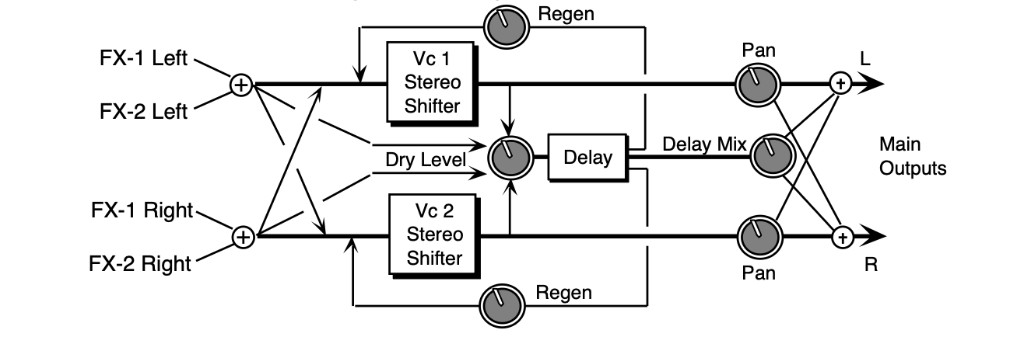
PITCH SHIFTER + DELAY combines a pitch shifter with a digital delay. PITCH SHIFTER + DELAY uses a continual crossfading technique of pitch shifting. This technique maintains the stereo field exactly. This pitch shifter works best for large pitch shift ratios, in some circumstances. Another feature of this algorithm is a digital delay that feeds back into the pitch shift. This feature allows spiraling upward or downward pitch shifts. The EFFECT MIX FX-1 and FX-2 parameters can be routed into the effect with different Dry/Wet mixes. This algorithm sounds best with a Mix of wet and dry. Try using a modulation controller for this parameter to fade in or fade out the pitch shifted signal.
VOICE-1 SEMIRange: -12 to +12
Allows you to adjust the pitch of Voice-1 up to an octave above or below the original pitch in semi-tones.
FINERange: -99 to +99
Allows you to fine tune the pitch of Voice-1.
LEVELRange: 00 to 99
This parameter adjusts the volume of Voice-1.
PANRange: -99 to +99
Allows you to assign the location of Voice-1 in the stereo field. A value of -99 would be far left, and +99 would be far right.
| VOICE-2 SEMI | LEVEL |
| FINE | PAN |
These parameters are identical to the previous ones, and control Voice-2.
DELAY REGENRange: -99 to +99
Controls the amount of feedback from the output of the delay back into the input of the pitch shifter. This allows you to create special effects with ascending/descending delays.
TIME (L and R)Range: 0000 to 1500 msec
These parameters control the amount of time for the pitch shifted signal to delay from the left and right inputs. The left and right delay times are completely independent.
MIXRange: 00 to 99
Controls the mix between the delay signal and the pitch shifted signal. A setting of 00 would be all pitch shifter, and no delay. A setting of 99 will be all delay and no direct pitch shift.
DRY LEVELRange: 00 to 99
Lets you to bypass the pitch shifter with an internal dry signal, and send it through the digital delay. Higher values would send more of the dry signal to the delay. The purpose of this parameter is to mix the dry signal appropriately with the pitch shifted delay signals.