Performance / Composition Synthesizer · Version 3.0
Section 7 — Effect Parameters (22–40 Reverb)
Dual Effects
The next two algorithms in the TS‑10 are called dual effects and allow two effect types to be used at the same time. Dual effect algorithms are similar to parallel effects in that they require you to assign the voices to either FX1 or FX2 (on the Output page). Dual effects offer two discrete effect processing paths, and are also ideal for Seq/Song mixdowns.
22 PLATE + PLATE REVERBS
This dual effect algorithm combines two plate reverbs, allowing you to create two discrete plate reverb effects.
FX1--PLATE REVERB1Range: 00 to 99
Controls the Dry/Wet mix for sounds routed to the first plate reverb (FX1 on the Output page).
FX1 DRYRange: 00 to 99
Controls the volume of a dry path around the first plate reverb.
FX2--PLATE REVERB2Range: 00 to 99
Controls the Dry/Wet mix for sounds routed to the second plate reverb (FX2 on the Output page).
FX2 DRYRange: 00 to 99
Controls the volume of a dry path around the second plate reverb.
REVERB1 - DECAY TIMERange: 0.40 to 140.0 sec
Controls the amount of time it takes for the reverberation to decay. Lower values of decay time sound good on drum and percussion tracks.
PRE-DLY TIMERange: 0000 to 0300 ms
Controls the amount of time it takes for the input signal to be presented to the plate reverb. A value of 0000 would offer no delay.
HF - DAMPINGRange: 00 to 99
Increasing the value of this parameter will gradually filter out increasing amounts of high-frequency energy. Higher values yield an abrupt decay. Controls the cut off of a low pass filter in series with the decay within the definition.
BANDWIDTHRange: 01 to 99
Acts as a low-pass filter on the output of the plate reverbs, controlling the amount of high frequencies present. The higher the setting, the more high frequencies are allowed to pass through, offering a brighter ringing sound. Some interesting effects can be created by using a mod controller over a large range.
DETUNE - RATERange: 00 to 99
Controls the LFO rate of detuning incorporated within the reverb. Detuning creates a slight pitch shift into the reverberated signal, giving it a more natural sounding decay by breaking up resonant nodes.
DEPTHRange: 00 to 99
Controls the depth of the detuning, that is, how much the pitch will change. Low values yield a metallic sound. Some voices sound best with very low values.
DEFINITIONRange: 00 to 99
Controls the rate at which echo density increases with time. Higher values can cause the echo density to build at a rate that exceeds the decay rate. Try to select the highest value that works with your sound source for the best performance.
DIFFUSIONRange: 00 to 99
The two diffusion parameters smear the input signal to create a smoother sound. Lower values will cause impulse sounds to appear as a series of discrete echoes, while higher values tend to increase the smear, making the echoes less apparent.
These parameters are identical to the previous ones, and allow you to create a completely independent plate reverb assigned to FX2.
23 PARAMETRIC EQ + PLATE
This dual effect algorithm combines a parametric EQ with a plate reverb, allowing independent effects processing.
FX1- -EQRange: 00 to 99
Controls the volume mix for sounds routed to the parametric EQ (FX1 on the Output page).
EQ- -REVBRange: 00 to 99
Controls the amount of EQ being sent into the plate reverb. A setting of 99 would yield a serial connection between the parametric EQ and the reverb for voices assigned to FX1 (on the Output page). A setting of 00 would eliminate any audible reverb for voices assigned to FX1.
FX2- -REVBRange: 00 to 99
Controls the Dry/Wet mix for sounds routed to the plate reverb (FX2 on the Output page).
FX2 DRYRange: 00 to 99
Controls the volume of a dry path around the plate reverb.
EQ INPUTRange: 00 to 99
Lets you to adjust the input level before the EQs to eliminate the possibility of clipping boosted signals.
OUTPUTRange: 00 to 99
Allows you to adjust the output gain to compensate for losses in perceived volume. Setting this gain too high will cause clipping of the output signal.
MID FCRange: 00000 to 15000 Hz
This parameter sets the center of the mid-frequency parametric. Higher values have a brighter sound.
BWRange: 00000 to 15000 Hz
This parameter is a bandwidth control that determines the width of the resonant peak at the center of the-frequency band. By raising the value, you can produce a narrower bandwidth.
LEVELRange: -99 to +48 dB
This parameter sets the amount of cut (negative values) or boost (positive values) applied to this mid-frequency parametric.
BASS FCRange: 00000 to 15000 Hz
Selects the cutoff-frequency of the lower-frequency band shelving filter.
LEVELRange: -99 to +48 dB
Sets the amount of boost or cut applied to the low shelving filter.
TREBLE FCRange: 00000 to 15000 Hz
Selects the cutoff-frequency of the upper-frequency band high shelving filter.
LEVELRange: -99 to +48 dB
Sets the amount of boost or cut applied to the high shelving filter.
REVB DECAY TIMERange: 0.40 to 140.0 sec.
Controls the amount of time it takes for the reverberation to decay. High values of decay time sound good on drum and percussion tracks.
PRE-DLY TIMERange: 0000 to 0300 ms
Controls the amount of time it takes for the input signal to be presented to the plate reverb. A value of 0000 would offer no delay.
HF - DAMPINGRange: 00 to 99
Increasing the value of this parameter will gradually filter out increasing amounts of highfrequency energy. Higher values yield an abrupt decay. Controls the cut off of a low pass filter in series with the decay within the definition.
BANDWIDTHRange: 01 to 99
Acts as a low-pass filter on the output of the plate reverbs, controlling the amount of high frequencies present. The higher the setting, the more high frequencies are allowed to pass through, offering a brighter ringing sound. Some interesting effects can be created by using a mod controller over a large range.
DETUNE - RATERange: 00 to 99
Controls the LFO rate of detuning incorporated within the reverb. Detuning creates a slight pitch shift into the reverberated signal, giving it a more natural sounding decay by breaking up resonant nodes.
DEPTHRange: 00 to 99
Controls the depth of the detuning, that is, how much the pitch will change. Low values yield a metallic sound. Some voices sound best with very low values.
DEFINITIONRange: 00 to 99
Controls the rate at which echo density increases with time. Higher values can cause the echo density to build at a rate that exceeds the decay rate. Try to select the highest value that works with your sound source for the best performance.
DIFFUSIONRange: 00 to 99
The two diffusion parameters smear the input signal to create a smoother sound. Lower values will cause impulse sounds to appear as a series of discrete echoes, while higher values tend to increase the smear, making the echoes less apparent.
24 SMALL PLATE REVERB
25 LARGE PLATE REVERB 1
A plate reverb takes the vibrations from a metal plate and uses them to create a metallic sounding reverb. SMALL PLATE REVERB is a tight sounding plate reverb, and LARGE PLATE REVERB 1 simulates a larger plate reverb. Small plate reverbs are most often used in the studio for drums and percussion, while large plate reverbs are often used to enhance a vocalist’s performance.
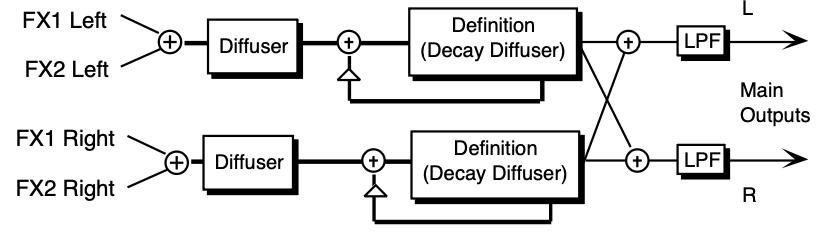
These two plate reverb algorithms share exactly the same signal routing topology. The internal values of the components (not user programmable) differentiate the large and small plate reverbs. The signal goes directly through the diffusers which smear the signal. The signal is then routed to a larger diffuser, known as Decay Definition, and is diffused over a period of time
(creating a decay). The signal is then routed to the output, and then goes through a low pass filter. There is a parameter that controls the Decay Time of both the left and right signals (shown as triangles above). This signal is then routed back into the definition. There is also an external dry signal (not shown) that goes directly from the input to the Main Output (DRY). The FX1 and FX2 MIX parameters can be routed into the effect for different Dry/Wet mixes.
DECAY TIMESmall Plate Range:
0.20 to 100.0 sec
Large Plate 1 Range: 0.40 to 140.0 sec
Controls the amount of time it takes for the reverberation to decay. High values of decay time sound good on these algorithms.
PRE-DLY TIMERange: 0000 to 0500 msec
Controls the amount of time it takes for the input signal to be presented to the plate reverb. A value of 0000 would offer no delay.
HF - DAMPINGRange: 00 to 99
Increasing the value of this parameter will gradually filter out increasing amounts of highfrequency energy. Higher values yield an abrupt decay. This parameter controls the cut off of a low pass filter in series with the decay within the definition.
BANDWIDTHRange: 01 to 99
Acts as a low-pass filter on the output of the plate reverbs, controlling the amount of high frequencies present. The higher the setting, the more high frequencies are allowed to pass through, offering a brighter ringing sound. Some interesting effects can be created by using a mod controller over a large range.
L/R BALANCERange: -99 to +99
Controls the left/right stereo balance of the plate reverb signal. A setting of -99 would offer hard left, whereas a setting of +99 offers hard right. A setting of +00 would place the reverb in the center of the stereo spectrum.
DEFINITIONRange: 00 to 99
Controls the rate at which echo density increases with time. Higher values can cause the echo density to build at a rate that exceeds the decay rate. For the best results, try to select the highest value that works with your sound source.
DIFFUSION- 1Range: 00 to 99
Smears the input signal to create a smoother sound. Lower values cause impulse sounds to appear as a series of discrete echoes, while higher values tend to increase the smear, making the echoes less apparent.
DIFFUSION- 2Range: 00 to 99
This diffuser, similar to and in series with the previous one, offers control over lower-frequency ranges. Plate reverbs tend to sound metallic, and the diffusers help to smear the signal, eliminating the metallic sound.
EARLY REFLECTION LEVELS (1 to 4)Range: -99 to +99
Control four early reflection levels. Setting these levels to lower values will produce a wetter sound. These four reflection levels are close to the input of the DEFINITION.
26 LARGE PLATE REVERB 2
This plate reverb shares the same signal routing topology as the previous plate reverbs, but sports poly-phase interpolation, and two additional parameters:
SPREADRange: 00000 to 31129
Determines the time intervals between the seven discrete echoes produced by the plate. The time intervals are adjusted relative to one another.
SHAPERange: -99 to +99
Determines the relative volume of the seven discrete echoes produced by the plate. At +00 seven echoes are all the same volume. At -99 the first echo is quietest, with successive echoes increasing in volume. At +99 produces the opposite effect.
27 HALL REVERB 1
This effect algorithm provides a studio-quality stereo reverb. The FX1 and FX2 MIX parameters can be routed into the effect for different Dry/Wet mixes. HALL REVERB is a reverb with a long decay, featuring left to right (transverse) reflections.
DECAY TIMERange: 0.20 to 100.0 msec
Controls the amount of time it takes for the reverberation to decay to a low level (-60 dB) after the input signal stops.
PRE-DLY TIMERange: 0000 to 0500 msec
This parameter creates a time delay before the original signal is fed into the reverb.
HF - DAMPINGRange: 00 to 99
Controls the rate of attenuation of high frequencies in the decay of the reverberation. As natural reverb decays, some high frequencies tend to get absorbed by the environment. Increasing the value of this parameter will filter out increasing amounts of high-frequency energy.
BANDWIDTHRange: 00 to 99
Acts as a low pass filter on the signal going into the reverb, controlling the amount of high frequencies that will pass into the effect. The higher the setting, the more high frequencies are allowed to pass.
LF DECAYRange: -99 to +99
This control will boost or cut the rate at which low frequencies will decay.
DIFFUSIONRange: 00 to 99
Determines whether the early reflections will appear as a series of discrete echoes (lower values) or will be more diffused (higher values).
DETUNE - RATERange: 00 to 99
Controls the LFO rate of detuning incorporated within the reverb. Detuning creates a slight pitch shift into the reverberated signal, giving it a more natural sounding decay by breaking up resonant nodes.
DEPTHRange: 00 to 99
Controls the depth of the detuning, that is, how much the pitch will change. Low values yield a metallic sound. Some voices sound best with very low values.
28 HALL REVERB 2
This algorithm can be programmed with a high degree of precision. HALL REVERB 2 is a large acoustic space providing a high density reverb.
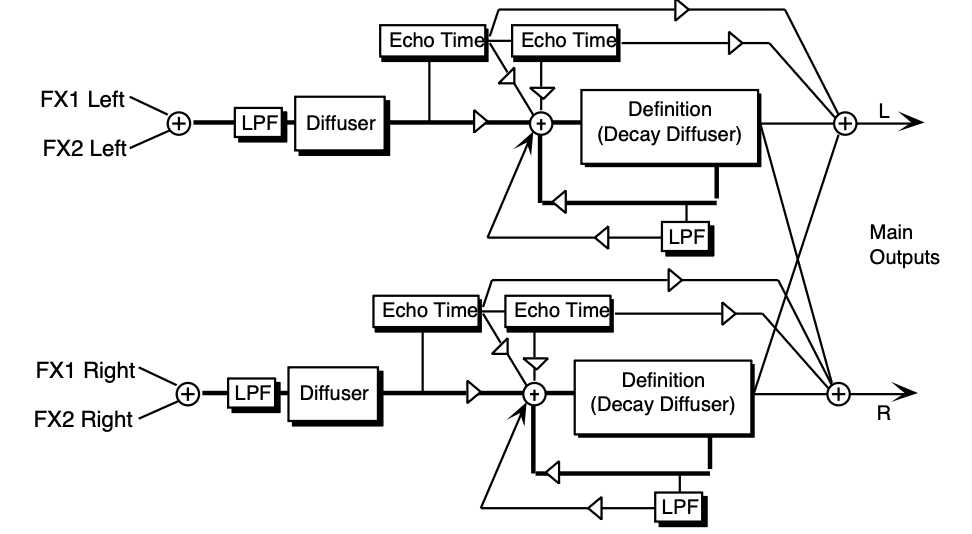
The signal enters a low pass filter and goes directly through the diffusers which smear the signal.
The signal is then routed to a larger decay diffuser, known as Definition, and is diffused over a period of time (creating a decay). There are taps from both the left and right Definition that are routed to the output to create a synthesized stereo output. A signal from the Definition goes through a low pass filter followed by a low-frequency decay parameter, which controls the rate of decay of the low frequencies. There is also a parameter at this stage that controls the decay time of both the left and right signals. The left and right signals are routed back into the Definition.
There are two echo times between the diffuser and the definition that can be routed directly to the output, or sent back through the definition. The EFFECT MIX FX-1 and FX-2 parameters allow you to create a Dry/Wet mix.
DECAY TIMERange: 0.70 to 250. sec
Controls the amount of time it takes for the reverberation to decay to a very low level after the input signal stops. We recommend higher values for the hall reverb.
PRE-DLY TIMEHall Reverb 2 Range: 0000 to 0500 msec
Controls the amount of time it takes for the original signal to be presented to the reverb. Higher values denote a longer delay.
HF - DAMPINGRange: 00 to 99
Controls the rate of attenuation of high frequencies in the decay of the reverberation. As natural reverb decays, some high frequencies tend to get absorbed by the environment. Increasing the value of this parameter will gradually filter out (dampen) more and more high-frequency energy.
BANDWIDTHRange: 01 to 99
The high-frequency bandwidth acts as a low pass filter on the signal going into the reverb, controlling the amount of high frequencies that will pass into the effect. The higher the setting, the more high frequencies are allowed to pass. This functions like a tone control on a guitar.
LF DECAY TIMERange: -99 to +99
Acts like a tone control and will boost (when set to a positive value) or cut (when set to a negative value) the rate at which low frequencies will decay.
DEFINITIONRange: 00 to 99
Controls the rate at which echo density is increased with time. Setting this parameter too high can cause the echo density to build at a rate which exceeds the decay rate. A general rule of thumb is this: DEFINITION should not exceed the LF DECAY TIME added to the DECAY TIME.
DIFFUSION-1Range: 00 to 99
Smears the input signal transients to diffuse and smooth the sound. Lower values cause impulse sounds to appear as a series of discrete echoes, while higher values tend to increase the smear (smoother sounding with fewer discrete echoes). We recommend settings of 50 for starters.
DIFFUSION-2Range: 00 to 99
This parameter, similar to and in series with DIFFUSION-1, performs the same way but controls lower-frequency ranges. Experiment with different levels between the diffuser parameters to find the settings that are right for your source.
REFL-1 TIMERange: 0000 to 0120 ms
Controls the delay time for the first pre-echo. Pre-echoes are the first sounds that have been reflected back from the walls or reflective “live” surfaces. Higher values delay the diffused signal more.
LEVELRange: 00 to 99
Controls the level of the first pre-echo. This pre-level controls the echo send to the DEFINITION.
SENDRange: 00 to 99
Controls the level of the first pre-echo, with the echo routed directly to the output.
REFL-2 TIMERange: 0000 to 0120 ms
Controls the delay time for the second pre-echo.
LEVELRange: 0 to 99
Controls the level of the second pre-echo. As a signal continues to bounce off the different reflective surfaces (walls), it decreases in volume. Set this parameter to a lower value than REFL-1 LEVEL to create a natural sounding echo.
SENDRange: 00 to 99
Controls the level of the second pre-echo, with the echo routed directly to the output.
DETUNE - RATERange: 00 to 99
Controls the LFO rate of detuning introduced into the reverberation decay. Detuning creates a slight oscillating pitch shift into the decay, giving it a more natural sound by breaking up resonant nodes.
DEPTHRange: 00 to 99
Controls the depth of the detuning, that is, how much the pitch will change. Low values yield a metallic sound. Some sounds may require very low values, while others sound more natural with higher values.
PRIMARY SENDRange: -99 to +99
Controls the level of the diffused input signal into the reverb definition.
REVB POSITION BAL- (1 to 3)Range: -99 to +99
The Position Balance parameters simulate the depth of the hall. Think of these parameters as three different microphones placed at various distances within the hall (the first is closest to the front, the third is farthest from the front). When the range (volume) is higher for BAL-1, the sound appears closer to the front, whereas a higher setting for BAL-3 appears farther from the front, suggesting a deeper (wetter) hall.
29 HALL REVERB 3
HALL REVERB 3 shares the same signal routing topology as HALL REVERB 2, with a few additional parameters:
DECAY DIFFUSIONRange: 00 to 99
Smears the reverb decay signal.
INPUT DIFFUSRange: 00 to 99
These parameters smear the input signal transients to diffuse and smooth the sound. Lower values cause impulse sounds to appear as a series of discrete echoes, while higher values tend to increase the smear (smoother sounding with fewer discrete echoes). We recommend settings of 50 for starters. Experiment with different levels between the diffuser parameters to find the settings that are right for your source.
SPREADRange: 00000 to 31129
Determines the time intervals between the seven discrete echoes produced by the hall. The time intervals are adjusted relative to one another.
SHAPERange: -99 to +99
Determines the relative volume of the seven discrete echoes produced by the hall. At +00 seven echoes are all the same volume. At -99 the first echo is quietest, with successive echoes increasing in volume. At +99 produces the opposite effect.
FRONT-TO-BACK LEVS (1 to 3)Range: -99 to +99
These three fields simulate the depth of the hall. Think of these fields as three different microphones placed at various distances within the hall (the first is closest to the front, the third is farthest from the front). When the range (volume) is higher for the first value, the sound appears closer to the front, whereas a higher setting for the last value appears farther from the front, suggesting a deeper (wetter) hall.
L/R BALANCERange: -99 to +99
Controls the left/right stereo balance of the hall reverb signal. A setting of -99 would offer hard left, whereas a setting of +99 would offer hard right. A setting of +00 would place the reverb in the center of the stereo spectrum.
PRIMARY SENDRange: -99 to +99
Controls the level of the diffused input signal into the reverb definition.
30 SMALL ROOM REVERB
SMALL ROOM REVERB features a short, room-like decay. The FX1 and FX2 parameters can be routed into the effect with different Dry/Wet mixes.
DECAY TIMERange: 0.20 to 100.0
Controls the amount of time it takes for the reverberation to decay to a low level (-60 dB) after the input signal stops.
PRE-DLY TIMERange: 0000 to 0500
Creates a delay in the amount of time it takes before the original signal is fed into the reverb. The range is based in milliseconds.
HF - DAMPINGRange: 00 to 99
Controls the rate of attenuation of high frequencies in the decay of the reverberation. As natural reverb decays, some high frequencies tend to get absorbed by the environment. Increasing the value of this parameter will filter out increasing amounts of high-frequency energy.
BANDWIDTHRange: 00 to 99
The high-frequency bandwidth parameter acts as a low pass filter on the signal going into the reverb, controlling the amount of high frequencies that will pass into the effect. The higher the setting, the more high frequencies are allowed to pass.
LF DECAYRange: -99 to +99
This control will boost or cut the rate at which low frequencies decay.
DIFFUSIONRange: 00 to 99
Determines whether the early reflections will appear as a series of discrete echoes (lower values) or will be more diffused (higher values).
DETUNE - RATERange: 00 to 99
Controls the LFO rate of detuning incorporated within the reverb. Detuning creates a slight pitch shift into the reverberated signal, giving it a more natural sounding decay by breaking up resonant nodes.
DEPTHRange: 00 to 99
Controls the depth of the detuning, that is, how much the pitch will change. Low values yield a metallic sound. Some voices sound best with very low values.
31 MEDIUM ROOM REVERB
MEDIUM ROOM REVERB provides a highly programmable medium room reverb, and LARGE ROOM REVERB offers a larger room with bright reflective surfaces.
31 MEDIUM ROOM REVERB
MEDIUM ROOM REVERB provides a highly programmable medium room reverb, and LARGE ROOM REVERB offers a larger room with bright reflective surfaces.
These algorithms share the same signal routing topology as HALL REVERB 2. However, the internal values of the components (not user-programmable) differentiate these reverbs. The
EFFECT MIX FX1 and EFFECT MIX FX2 parameters can be routed into the effect with different Dry/Wet mixes.
DECAY TIMEMedium Room Range:
0.20 to 1.33
Large Room Range: 0.20 to 1.83
Controls the amount of time it takes for the reverberation to decay to a very low level after the input signal stops. In room reverbs we don’t recommend higher settings, which tend to create an infinite and unnatural sustain. Since most ambient room reverbs don’t naturally have a large decay, set this low for the best sound.
PRE-DLY TIMERange: 0000 to 0750 msec
Controls the amount of time it takes for the original signal to be presented to the reverb. Higher values denote a longer delay.
HF - DAMPINGRange: 00 to 99
Controls the rate of attenuation of high frequencies in the decay of the reverberation. As natural reverb decays, some high frequencies tend to get absorbed by the environment. Increasing the value of this parameter will gradually filter out (dampen) more and more high-frequency energy.
BANDWIDTHRange: 00 to 99
The high-frequency bandwidth acts as a low pass filter on the signal going into the reverb, controlling the amount of high frequencies that will pass into the effect. The higher the setting, the more high frequencies are allowed to pass. This functions like a tone control on a guitar.
LF DECAY TIMERange: -99 to +99
Functions as a tone control and boosts (when set to a positive value) or cuts (when set to a negative value) the rate at which low frequencies will decay.
DEFINITIONRange: 00 to 99
Controls the rate at which echo density is increased with time. Setting this parameter too high can cause the echo density to build at a rate which exceeds the decay rate. A general rule of thumb is this: DEFINITION should not exceed the LF DECAY TIME added to the DECAY TIME.
INPUT DIFFUSION-1Range: 00 to 99
These four values, in series with each other, smear the input signal transients, to diffuse and smooth the sound. Lower values will cause impulse sounds to appear as a series of discrete echoes, while higher values tend to increase the smear (smoother sounding with fewer discrete echoes). Experiment with different levels between the diffuser parameters to find the settings that are right for your source. We recommend settings of 50 for starters.
REFL-1 TIMERange: 0000 to 0150 msec
Controls the delay time for the first pre-echo. Pre-echoes are the first sounds that have been reflected back from the walls or reflective “live” surfaces. Higher values delay the diffused signal more.
REFL-1 LEVELRange: 00 to 99
Controls the level of the first pre-echo. This pre-level controls the echo send to the Definition.
REFL-1 SENDRange: 00 to 99
Controls the level of the first pre-echo, with the echo routed directly to the output.
REFL-2 TIMERange: 0000 to 0150 msec
Controls the delay time for the second pre-echo.
REFL-2 LEVELRange: 00 to 99
Controls the level of the second pre-echo. As a signal continues to bounce off the different reflective surfaces (walls), it decreases in volume. Set this parameter to a lower value than REFL-1 LEVEL to create a natural sounding echo.
REF-2 SENDRange: 00 to 99
Controls the level of the second pre-echo, with the echo routed directly to the output.
DETUNE - RATERange: 00 to 99
Controls the LFO rate of detuning introduced into the reverberation decay. Detuning creates a slight oscillating pitch shift into the decay, giving it a more natural sound by breaking up resonant nodes.
DEPTHRange: 00 to 99
Controls the depth of the detuning, that is, how much the pitch will change. Low values yield a metallic sound. Some sounds may require very low values, while others sound more natural with higher values.
L/R BALANCERange: -99 to +99
Controls the left/right stereo balance of the gated reverb signal. A setting of -99 would offer hard left, whereas a setting of +99 would offer hard right. A setting of +00 would place the reverb in the center of the stereo spectrum.
PRIMARY SENDRange: -99 to +99
Controls the level of the diffused input signal into the reverb definition.
33 TIGHT AMBIENCE
34 WIDE AMBIENCE
TIGHT AMBIENCE provides room ambience. WIDE AMBIENCE provides a larger ambient room reverb. These two algorithms offer studio quality ambient reverbs that can be controlled with a high degree of precision. The FX1 and FX2 parameters can be routed into the effect with different Dry/Wet mixes.
These algorithms share essentially the same signal routing topology as HALL REVERB 2.
However, the internal values of the components (not user-programmable) differentiate these three reverbs.
DECAY TIMETight Ambience
Range: 0.20 to 100.0 sec
Wide Ambience Range: 0.20 to 150.0 sec
Controls the amount of time it takes for the reverberation to decay to a very low level after the input signal stops. In these reverbs we don’t recommend higher settings, which tend to create an infinite and unnatural sustain. Since most ambient reverbs don’t naturally have a large decay, set this low for the best sound.
PRE-DLY TIMERange: 0000 to 0500 msec
Controls the amount of time it takes for the original signal to be presented to the reverb. Higher values denote a longer delay.
HF - DAMPINGRange: 00 to 99
Controls the rate of attenuation of high frequencies in the decay of the reverberation. As natural reverb decays, some high frequencies tend to get absorbed by the environment. Increasing the value of this parameter will gradually filter out (dampen) more and more high-frequency energy.
BANDWIDTHRange: 00 to 99
The high-frequency bandwidth acts as a low pass filter on the signal going into the reverb, controlling the amount of high frequencies that will pass into the effect. The higher the setting, the more high frequencies are allowed to pass. This functions like a tone control on a guitar.
LF DECAY TIMERange: -99 to +99
Functions as a tone control and boosts (when set to a positive value) or cuts (when set to a negative value) the rate at which low frequencies will decay.
DEFINITIONRange: 00 to 99
Controls the rate at which echo density is increased with time. Setting this parameter too high can cause the echo density to build at a rate which exceeds the decay rate. A general rule of thumb is this: DEFINITION should not exceed the LF DECAY TIME added to the DECAY TIME.
DIFFUSION-1Range: 00 to 99
Smears the input signal transients, to diffuse and smooth the sound. Lower values will cause impulse sounds to appear as a series of discrete echoes, while higher values tend to increase the smear (smoother sounding with fewer discrete echoes). We recommend settings of 50 for starters.
DIFFUSION-2Range: 00 to 99
This parameter, similar to and in series with DIFFUSION-1, performs the same way but controls lower-frequency ranges. Experiment with different levels between the diffuser parameters to find the settings that are right for your source.
REFL-1 TIMERange: 0000 to 0120 msec
Controls the delay time for the first pre-echo. Pre-echoes are the first sounds that have been reflected back from the walls or reflective “live” surfaces. Higher values delay the diffused signal more.
REFL-1 LEVELRange: 00 to 99
Controls the level of the first pre-echo. This pre-level controls the echo send to the Definition.
REFL-1 SENDRange: 00 to 99
Controls the level of the first pre-echo, with the echo routed directly to the output.
REFL-2 TIMERange: 0000 to 0120 msec
Controls the delay time for the second pre-echo.
REFL-2 LEVELRange: 00 to 99
Controls the level of the second pre-echo. As a signal continues to bounce off the different reflective surfaces (walls), it decreases in volume. Set this parameter to a lower value than REFL-1 LEVEL to create a natural sounding echo.
REF-2 SENDRange: 00 to 99
Controls the level of the second pre-echo, with the echo routed directly to the output.
DETUNE - RATERange: 00 to 99
Controls the LFO rate of detuning introduced into the reverberation decay. Detuning creates a slight oscillating pitch shift into the decay, giving it a more natural sound by breaking up resonant nodes.
DEPTHRange: 00 to 99
Controls the depth of the detuning, that is, how much the pitch will change. Low values yield a metallic sound. Some sounds may require very low values, while others sound more natural with higher values.
PRIMARY SENDRange: -99 to +99
Controls the level of the diffused input signal into the reverb definition.
POSITION BAL -(1 to 3)Range: -99 to +99
The Position Balance parameters simulate the depth of the room. Think of these parameters as three different microphones placed at various distances within the room (the first is closest to the front, the third is farthest from the front). When the range (volume) is higher for BAL-1, the sound appears closer to the front, whereas a higher setting for BAL-3 appears farther from the front, suggesting a deeper (wetter) room.
35 NONLINEAR REVERB 1
36 NONLINEAR REVERB 2
37 NONLINEAR REVERB 3
Non Linear Reverbs can be used to obtain blooming reverb, gated reverb, reverse reverb and early reflections. In general, they do not produce an exponentially decaying reverb. Unlike the hall, room, and plate reverbs, NONLINEAR REVERB 1, 2, and 3 pass the input signal through the reverb diffusers only once. For this reason the reverb diffusers are called Density, to distinguish them from the other reverb diffusers (called Definition). Density controls the amount of echo density, as opposed to the rate of increase of echo density. Other reverbs give limited control of early reflections. The Non Linear reverbs deliberately impose a coloration on the resulting sound.
- NONLINEAR REVERB 1 is optimized for shorter duration effects (approx. 0.5 sec.)
- NONLINEAR REVERB 2 offers approx. a 1.5 sec. duration
- NONLINEAR REVERB 3 is sonically similar to NONLINEAR REVERB 1, but there is less stereo movement, making it better suited for drum tracks

The signal goes directly through a diffuser which smears the signal. The signal is then routed to a decay diffuser (Density), and is diffused over a period of time. Within the density the signal goes through a high-frequency damper. The signal is then routed to the output. After the density, the signal passes through a low pass filter. There are two echo times between the diffuser and the density. There is also an external dry signal (not shown) that goes directly from the input to the Main Output (DRY). The FX1 and FX-2 MIX parameters can be routed into the effect with different Dry/Wet mixes.
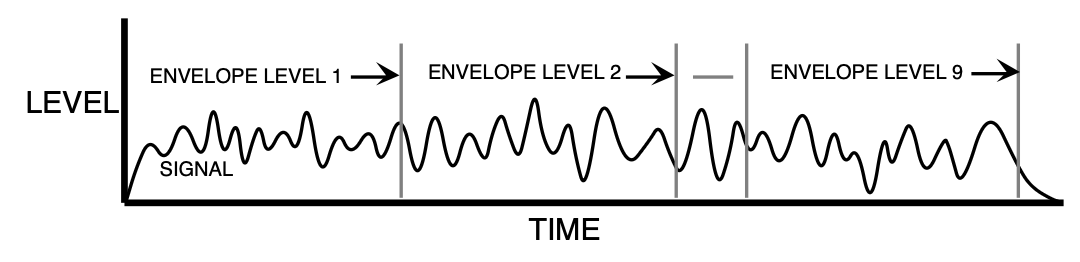
ENVELOPE LEVELS (1 to 9)Range: 00 to 99
Control the output tap levels sequenced in time across the density from input to output. Envelope Level 1 is tapped right after the diffusers and before the echoes (see the diagram). If this is undesirable, set Envelope Level 1 to 0. Envelope Levels 8 and Envelope Levels 9 are positioned at the very end of the Density; setting these too high can cause excessive ringing. Envelope Levels 8 and Envelope Levels 9 are also very dry. Set all nine tap levels to find the envelope for your application. We recommend the average Envelope Level not to exceed a value of 45 to prevent overdriving these reverbs.
DENSITY-1Range: 00 to 99
Controls the number of echoes.
DENSITY-2Range: 00 to 99
DENSITY-2 controls the number of echoes in a lower-frequency range. In general, to get the smoothest sound, DENSITY-2 is usually less than the value of DENSITY-1.
DIFFUSION-1Range: 00 to 99
Smears the input signal transients of higher-frequency ranges. Higher values are recommended for smoother percussion. Very low values will give a highly repetitive echo-like sound. DIFFUSION-1 and DIFFUSION-2 exist within each diffuser block (see signal routing diagram).
DIFFUSION-2Range: 00 to 99
DIFFUSION-2 is similar to DIFFUSION-1, but offers control of lower frequencies. In general a setting of 50 can be considered an equal mix of dry/diffused sound. This setting is a good starting point.
PRIMARY SENDRange: -99 to +99
Controls the level of the diffused input signal which is nearly instantaneous with respect to the input. This signal is injected directly into the Density at the specified level.
L/R BALANCERange: -99 to +99
Controls the left/right stereo balance of the gated reverb signal. A setting of -99 would offer hard left, whereas a setting of +99 would offer hard right. A setting of +0 would place the reverb in the center of the stereo spectrum.
HF - DAMPINGRange: 00 to 99
HF DAMPING is located within the Density. This parameter selects the amount of high-frequency energy to be filtered out.
BANDWIDTHRange: 00 to 99
The high-frequency bandwidth parameter acts as a low-pass filter on the output signal, controlling the amount of high frequencies that will be heard. The higher the setting the more high frequencies are heard. This works the same way that a tone control would work on a guitar.
REFL-1 TIMENon Lin 1, 3
Range: 0000 to 0600 msec
Non Lin 2 Range: 0000 to 0085 msec
Controls the amount of time it takes for the first pre-echo to be injected into the Density. Pre-echoes are the sounds that have been reflected back from the walls or other reflective surfaces.
REFL-1 SENDRange: -99 to +99
Controls the level of the first pre-echo.
REFL-2 TIMENon Lin 1, 3
Range: 0000 to 0600 msec
Non Lin 2 Range: 0000 to 0085 msec
Controls the amount of time it takes for the second pre-echo to be injected into the Density.
REFL-2 SENDRange: -99 to +99
Controls the level of the second pre-echo. Experiment with both positive and negative on all echoes to change the tonal character of the results.
38 GATED REVERB
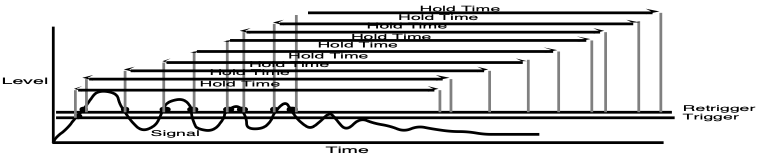
GATED REVERB provides an excellent gated reverb. When a reverb is muted part way through, it creates a gated sound. To achieve this gated effect, both the Gated and Reverse reverbs must gate a number of internal parameters, not just the output amplitude envelope. It is however, the output amplitude over which the user has control. The TS‑10 offers a highly controllable gated reverb, optimized for percussive instruments, but useful for any signal. The gate is first opened when the input signal passes the trigger threshold. This trigger threshold is set as low as possible by the user, so that none of the input signal is missed. The gated reverb is distinguished from the reverse reverb by retriggering whenever the input signal passes a retrigger (user programmable) threshold (see diagrams). The gate will stay open as long as the input signal remains above the retrigger threshold, and all the input signals will be accumulated under this gate until the total input signal level falls below the retrigger threshold. When this happens, the Hold time will begin (as shown in the diagram below). The reason for two thresholds is to eliminate false retriggering and to ensure precise hold-time durations. If you desire a separate gate on each note, use the Non Lin reverbs.
The topology for the Gated Reverb is derived from the Plate Reverb. The FX1 and FX2 parameters can be routed into the effect with different Dry/Wet mixes.
Gated Reverb with a High Retrigger Threshold
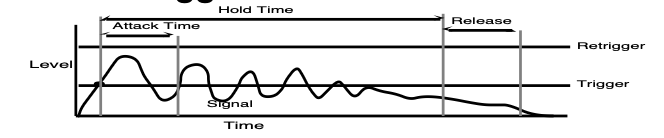
Gated Reverb with a Low Retrigger Threshold
HF DAMPINGRange: 00 to 99
This parameter sounds best when set to low values. Its function is to filter out more and more high-frequency energy. For the most natural sounding reverse effect, we recommend a setting of 00.
DEFINITIONRange: 00 to 99
DEFINITION controls the rate at which echo density is increased with time. If set too high, the echo density will build at a rate that exceeds the decay rate. This can be used for a special effect.
DIFFUSION-1Range: 00 to 99
DIFFUSION-1 smears the input signal making a smoother sounding reverb. Controls the high-frequency ranges. For percussion sounds, high values are recommended.
DIFFUSION-2Range: 00 to 99
Similar to and in series with DIFFUSION-1, this parameter controls lower-frequency ranges.
ATTACKRange: 1msec to 10.0 sec
Sets the ATTACK of the gated reverb once the incoming signal has reached the trigger level.
Generally the attack should be short and not set longer than the HOLD. This parameter should not be used to achieve a reverse reverb envelope, because here the attack volume increases whereas in the Reverse Reverb the attack volume accelerates.
DECAYRange: 0.20 sec to 100.0 sec
Controls the amount of time it takes for the reverberation to decay.
HOLDRange: 1 msec to 10.0 sec
Sets the amount of time that the reverb will hold after the retrigger and before the release. The HOLD will begin again if retriggered.
RELEASERange: 1 msec to 10.0 sec
Sets the amount of time after the HOLD has elapsed for the gated reverb to shut down. Generally these times are very short.
SLAPBACK - TIMERange: 0000 to 0500 msec
Controls the delay time of an internal dry stereo signal to create a slapback. In general, the SLAPBACK - TIME is greater or equal to the HOLD time to achieve a reverse effect.
LEVELRange: 00 to 99
Adjusts the volume of the slapback (internal dry) signal. A value of 00 would eliminate any audible slapback.
RETRIG THRESHRange: -96 to +00 dB
This parameter sets the level at which the Gated Reverb will retrigger. For a precise HOLD time that begins at the onset of the incoming source, this parameter should be set higher than the incoming signal to prevent retriggering. After the incoming signal reaches the trigger threshold, the gated reverb is activated. Every time the signal reaches the retrigger threshold, the gated reverb will retrigger causing the HOLD time to restart.
If the level of this parameter is set lower than the incoming signal, the gated reverb will continue to retrigger. With a high DECAY level, this adds a cavernous quality to percussion instruments.
TRIG THRESHRange: -96 to +00 dB
Sets the signal level that triggers the gated reverb. When the incoming signal reaches this value, it triggers (starts) the gated reverb. Higher values would require a stronger incoming signal. Set this parameter as low as possible to work with your particular source, but not too low to cause false triggering.
EARLY REFLECTION LEVELS (1 to 4)Range: -99 to +99
These parameters control four early reflection levels. Setting these levels to lower values will produce a wetter sound.
L/R BALANCERange: -99 to +99
Controls the left/right stereo balance of the Gated Reverb signal. A setting of -99 would offer hard left, whereas a setting of +99 would offer hard right. A setting of +00 would place the reverb in the center of the stereo spectrum.
LEVELRange: 00 to 99
Adjusts the volume of the slapback (internal dry) signal. A value of 00 would eliminate audible slapback.
TRIG THRESHRange: -96 to +00 dB
Set this parameter as low as possible to work with your particular sound source. To eliminate false triggering, it should not be set too low. When the input signal rises above this threshold, the Reverse Reverb envelope will begin.
40 REVERSE REVERB 2
REVERSE REVERB 2 is identical to REVERSE REVERB, except this algorithm will retrigger by an assigned input signal level (threshold) determined by the user. Once triggered, the reverse envelope will proceed to completion, unless retriggered by subsequent input signals. If you are looking for a reverse effect that will not retrigger, try using the previous reverse reverb algorithm. The FX1 and FX2 MIX parameters are used to select different Dry/Wet mixes.
HF DAMPINGRange: 00 to 99
This parameter sounds best when set to low values. Its function is to filter out more and more high-frequency energy. For the most natural sounding reverse effect, we recommend a setting of 00.
DEFINITIONRange: 00 to 99
DEFINITION controls the rate at which echo density is increased with time. If set too high, the echo density will build at a rate that exceeds the decay rate. This can be used for a special effect.
DIFFUSION-1Range: 00 to 99
DIFFUSION-1 smears the input signal making a smoother sounding reverb. Controls the highfrequency ranges. For percussion sounds, high values are recommended.
DIFFUSION-2Range: 00 to 99
Similar to and in series with DIFFUSION-1, this parameter controls lower-frequency ranges.
ATTACKRange: 1 msec to 10.0 sec
This parameter sets the duration over which the reverb builds. It is recommended that you set this value less than the HOLD time.
HOLDRange: 1 msec to 10.0 sec
Controls the amount of time that the reverse will sound after it has been triggered. Rule of thumb: don’t set the HOLD time much longer than the ATTACK time.
RELEASERange: 1 msec to 10.0 sec
Determines the RELEASE time after the HOLD time has elapsed. Generally this time is very short. Lower values offer an abrupt cutoff.
PRE-TRIG TIMERange: 0000 to 0530 msec
Used to capture transients that occur before the trigger. This parameter is critical to the sound quality. You can determine how much pretrigger sound will be injected into the reverse reverb tank.
TRIG THRESHRange: -96 to +00 dB
Set this parameter as low as possible to work with your particular sound source. To eliminate false triggering, it should not be set too low. When the input signal rises above this threshold, the reverse envelope will begin.