Performance / Composition Synthesizer · Version 3.0
Section 12 — General MIDI
What is General MIDI?
General MIDI (GM) is an industry standard for program mapping that defines 128 sounds and
their locations. This means that if a device conforms to the GM standard, MIDI Program Change #1 will always call
up an acoustic piano,
MIDI Program Change #62 will always call up a brass section, etc. Although the actual sounds (tone and quality)
will vary from product to product, each specific MIDI Program number will always call up the same type of
sound.
Sound Map
The General MIDI Sound Map (found later in this section) lists the 128 General MIDI sounds in the TS‑10 ROM and
their assigned General MIDI Program Change numbers.
Percussion
General MIDI also includes a Percussion Key Map, defining specific drum voices for each key. To avoid confusion,
General MIDI always assigns percussion to MIDI channel 10. The General MIDI Percussion Key Map can be found after
the General MIDI Sound Map.
GS/MT-32 Compatibility
GS is an extended MIDI sound specification originated by Roland® Corp. Although we provide the GS Drum Maps
(listed later) and MT-32 Program Change Map for Roland Sound Canvas™ compatibility, the TS‑10 is not GS compatible
and does not contain the GS Alternate Sound Banks.
Other General MIDI Requirements
A General MIDI sound module must respond to all 16 MIDI channels, with dynamic voice allocation, and a minimum of
24 voices. It also must respond to velocity, pitch bend, mod wheel, volume and pan, expression, sustain, and the
All Notes Off and Reset All Controllers messages.
With these controllers supported, a composition that relies on note articulations and mix settings can be played
back and still sound correct when played by any GM sound module. The TS‑10 supports all of the above MIDI
messages, and fully conforms to the General MIDI Specification.
Why use General MIDI?
While the TS‑10 instruments are a superb sound source, with greater fidelity and more programmability than most
GM modules, there are interesting applications for General MIDI that can enhance your music making.
There is an interesting genre of music software (for your computer) that creates backing patterns for you to
play along with, for pleasure and study.
Many pre-recorded pieces of music can be purchased for home listening, solo performance backing tracks (e.g.,
instant karaoke), and other applications. Note that this application requires a computer/hardware
sequencer/sequencer player and some type of computer software (such as those listed above). Look through current
issues of music/computer software magazines for listings (these products must conform to the Standard MIDI File
[SMF] format* in order to use them properly).
There is an ever-increasing amount of educational software that uses General MIDI for such applications as ear
training, music lessons, etc.
Some computer games offer General MIDI as an optional sound source. The TS‑10 will provide high quality sound
variations for this enjoyable leisure activity, enhancing the excitement and thrill of your computer games.
General MIDI Sound Map
The following map shows the General MIDI sound name and program change number of each
sound as they appear in the TS‑10. This map also shows how General MIDI divides the instruments into 16 categories
of similar sounds:
PROG #
INSTRUMENT
PROG #
INSTRUMENT
PROG #
INSTRUMENT
PROG #
INSTRUMENT
1-8
PIANO
33-40
BASS
65-72
REED
97-104
SYNTH EFFECTS
1
GRAND-PIANO
33
ACOUSTIC-BS
65
SOPRANO-SAX
97
EFFECTS
2
BRITE-PIANO
34
FINGERED-BS
66
ALTO-SAX
98
ICE-RAIN
3
ELEC-GRAND
35
PICKED-BASS
67
TENOR-SAX
99
SOUNDTRACK
4
HONKY-TONK
36
FRETLESS-BS
68
BARI-SAX
100
CRYSTAL
5
ELEC-PIANO1
37
SLAP-BASS-1
69
OBOE
101
ATMOSPHERE
6
ELEC-PIANO2
38
SLAP-BASS-2
70
ENGLISH-HRN
102
BRIGHTNESS
7
HARPSICHORD
39
SYNTH-BASS1
71
BASSOON
103
GOBLINS
8
CLAVINET
40
SYNTH-BASS2
72
CLARINET
104
ECHO-DROPS STAR-THEME
9-16
CHROMATIC PERCUSSION
41-48
STRINGS
73-80
PIPE
105-112
ETHNIC
9
CELESTA
41
VIOLIN
73
PICCOLO
105
SITAR
10
GLOCKNSPIEL
42
VIOLA
74
FLUTE
106
BANJO
11
MUSIC-BOX
43
CELLO
75
RECORDER
107
SHAMISEN
12
VIBRAPHONE
44
CONTRABASS
76
PANFLUTE
108
KOTO
13
MARIMBA
45
TREMOLO-STR
77
BOTTLE-BLOW
109
KALIMBA
14
XYLOPHONE
46
PIZZI-STRGS
78
SHAKUHACHI
110
BAGPIPES
15
TUBULR-BELLS
47
HARP
79
WHISTLE
111
FIDDLE
16
DULCIMER
48
TYMPANI
80
OCARINA
112
SHANNAI
17-24
ORGAN
49-56
ENSEMBLE
81-88
SYNTH LEAD
113-120
PERCUSSIVE
17
DRWBAR-ORGN
49
STRG-ENSMBL
81
SQUARE-WAVE
113
TINKLE-BELL
18
PERC-ORGAN
50
SLOW-STRNGS
82
SAW-WAVE
114
AGOGO
19
ROCK-ORGAN
51
SYNTH-STR-1
83
CALLIOPE
115
STEEL-DRUMS
20
CHRCH-ORGAN
52
SYNTH-STR-2
84
CHIFF-LEAD
116
WOODBLOCK
21
REED-ORGAN
53
CHOIR-AAHS
85
CHARANG
117
TAIKO-DRUM
22
ACCORDION
54
VOICE-OOHS
86
SOLO-VOICE
118
MELODIC-TOM
23
HARMONICA
55
SYNTH-VOICE
87
SAW-FIFTHS
119
SYNTH-DRUM
24
BANDONEON
56
ORCH-HIT
88
BASS+LEAD
120
REVERSE-CYM
25-32
GUITAR
57-64
BRASS
89-96
SYNTH PAD
121-128
SOUND EFFECTS
25
NYL-STR-GTR
57
TRUMPET
89
NEW-AGE-PAD
121
GT-FRETNOIS
26
STL-STR-GTR
58
TROMBONE
90
WARM-PAD
122
BREATHNOISE
27
JAZZ-GUITAR
59
TUBA
91
POLYSYNTH
123
SEASHORE
28
CLEAN-GUITR
60
MUTED-TRMPT
92
SPACE-VOICE
124
BIRD-TWEET
29
MUTED-GUITR
61
FRENCH-HORN
93
BOWED-GLASS
125
TELEPHONE
30
OVRDRIV-GTR
62
BRASS-SECTN
94
METALIC-PAD
126
HELICOPTER
31
DISTORT-GTR
63
SYN-BRASS-1
95
HALO-PAD
127
APPLAUSE
32
GTR-HRMONIC
64
SYN-BRASS-2
96
SWEEP-PAD
128
GUN-SHOT
Note that the names listed above are as they appear in the TS‑10, and not as they appear in the General MIDI
Spec. The only differences are in spelling.
GM and GS Percussion Key Maps (Channel 10)
MIDI Note #
Key Name
1 - STANDARD KIT 33-JAZZ-KIT
9 - ROOM KIT
17 - POWER-KIT
25 - ELECTRONIC KIT
35
B1
Kick Drum 2
Kick Drum 2
Kick Drum
Kick Drum
36
C2
Kick Drum 1
Kick Drum 1
Mondo Kick
Elec Bass Drum
___ 37
C2+
Side Stick
Side Stick
Side Stick
Side Stick
38
D2
Acoustic Snare
Acoustic Snare
Gated Snare
Electric Snare
___ 39
D2+
Hand Clap
Hand Clap
Hand Clap
Hand Clap
40
E2
Electric Snare
Electric Snare
Electric Snare
Gated Snare
41
F2
Low Floor Tom
Low Room Tom
Low Room Tom
Elec Low Tom
___ 42
F2+
Closed Hi-Hat
Closed Hi-Hat
Closed Hi-Hat
Closed Hi-Hat
43
G2
High Floor Tom
Low Room Tom 2
Low Room Tom 2
Elec Low Tom
___ 44
G2+
Pedal Hi-Hat
Pedal Hi-Hat
Pedal Hi-Hat
Pedal Hi-Hat
45
A2
Low Tom
Mid Room Tom
Mid Room Tom
Elec Mid Tom
___ 46
A2+
Open Hi-Hat
Open Hi-Hat
Open Hi-Hat
Open Hi-Hat
47
B2
Low-Mid Tom
Mid Room Tom
Mid Room Tom
Elec Mid Tom
48
C3
High-Mid Tom
High Room Tom
High Room Tom
Elec High Tom
___ 49
C3+
Crash Cymbal 1
Crash Cymbal 1
Crash Cymbal 1
Crash Cymbal 1
50
D3
High Tom
High Room Tom
High Room Tom
Elec High Tom
___ 51
D3+
Ride Cymbal 1
Ride Cymbal 1
Ride Cymbal 1
Ride Cymbal 1
52
E3
Chinese Cymbal
Chinese Cymbal
Chinese Cymbal
Reverse Cymbal
53
F3
Ride Bell
Ride Bell
Ride Bell
Ride Bell
___ 54
F3+
Tambourine
Tambourine
Tambourine
Tambourine
55
G3
Splash Cymbal
Splash Cymbal
Splash Cymbal
Splash Cymbal
___ 56
G3+
Cowbell
Cowbell
Cowbell
Cowbell
57
A3
Crash Cymbal 2
Crash Cymbal 2
Crash Cymbal 2
Crash Cymbal 2
___ 58
A3+
Vibraslap
Vibraslap
Vibraslap
Vibraslap
59
B3
Ride Cymbal 2
Ride Cymbal 2
Ride Cymbal 2
Ride Cymbal 2
60
C4
High Bongo
High Bongo
High Bongo
High Bongo
___ 61
C4+
Low Bongo
Low Bongo
Low Bongo
Low Bongo
62
D4
Mute High Conga
Mute High Conga
Mute High Conga
Mute High Conga
___ 63
D4+
Open High Conga
Open High Conga
Open High Conga
Open High Conga
64
E4
Low Conga
Low Conga
Low Conga
Low Conga
65
F4
High Timbale
High Timbale
High Timbale
High Timbale
___ 66
F4+
Low Timbale
Low Timbale
Low Timbale
Low Timbale
67
G4
High Agogo
High Agogo
High Agogo
High Agogo
___ 68
G4+
Low Agogo
Low Agogo
Low Agogo
Low Agogo
69
A4
Cabasa
Cabasa
Cabasa
Cabasa
___ 70
A4+
Maracas
Maracas
Maracas
Maracas
71
B4
Short Whistle
Short Whistle
Short Whistle
Short Whistle
72
C5
Long Whistle
Long Whistle
Long Whistle
Long Whistle
___ 73
C5+
Short Guiro
Short Guiro
Short Guiro
Short Guiro
74
D5
Long Guiro
Long Guiro
Long Guiro
Long Guiro
___ 75
D5+
Claves
Claves
Claves
Claves
76
E5
High Wood Block
High Wood Block
High Wood Block
High Wood Block
77
F5
Low Wood Block
Low Wood Block
Low Wood Block
Low Wood Block
___ 78
F5+
Mute Cuica
Mute Cuica
Mute Cuica
Mute Cuica
79
G5
Open Cuica
Open Cuica
Open Cuica
Open Cuica
___ 80
G5+
Mute Triangle
Mute Triangle
Mute Triangle
Mute Triangle
81
A5
Open Triangle
Open Triangle
Open Triangle
Open Triangle
___ 82
A5+
Shaker
Shaker
Shaker
Shaker
83
B5
Jingle Bell
Jingle Bell
Jingle Bell
Jingle Bell
84
C6
Belltree
Belltree
Belltree
Belltree
___ 85
C6+
Castanets
Castanets
Castanets
Castanets
86
D6
Mute Surdo
Mute Surdo
Mute Surdo
Mute Surdo
___ 87
D6+
Open Surdo
Open Surdo
Open Surdo
Open Surdo
88
E6
GM and GS Percussion Key Maps (Channel 10)
MIDI Note #
Key Name
26 - TR-808-KIT
41 - BRUSH-KIT
49 - ORCH-PERCSN
128 - MT-32-KIT
35
B1
Kick Drum 2
Kick Drum 2
Concert Bass Drum
Acoustic Bass Drum
36
C2
808 Bass Drum
Kick Drum 1
Concert Bass Drum
Bass Drum 1
___ 37
C2+
808 Rim Shot
Side Stick
Side Stick
Rim Shot
38
D2
808 Snare Drum
Brush Tap
Concert Snare Drum
Acoustic Snare
___ 39
D2+
Hand Clap
Brush Slap
Castanets
Hand Clap
40
E2
Electric Snare
Brush Swirl
Concert Snare Drum
Electric Snare
41
F2
808 Low Tom
Low Floor Tom
Tympani F
Acoustic Low Tom
___ 42
F2+
808 Closed Hi-Hat
Closed Hi-Hat
Tympani F#
Closed Hi-Hat
43
G2
808 Low Tom
High Floor Tom
Tympani G
Acoustic Low Tom
___ 44
G2+
808 Closed Hi-Hat
Pedal Hi-Hat
Tympani G#
Open Hi-Hat
45
A2
808 Mid Tom
Low Tom
Tympani A
Acoustic Mid Tom
___ 46
A2+
80 Open Hi-Hat
Open Hi-Hat
Tympani A#
Open Hi-Hat
47
B2
808 Mid Tom
Mid Tom
Tympani B
Acoustic Mid Tom
48
C3
808 High Tom
High Tom
Tympani C
Acoustic High Tom
___ 49
C3+
808 Cymbal
Crash Cymbal 1
Tympani C#
Crash Cymbal
50
D3
808 High Tom
High Tom
Tympani D
Acoustic High Tom
___ 51
D3+
Ride Cymbal 1
Ride Cymbal 1
Tympani D#
Ride Cymbal 1
52
E3
Chinese Cymbal
Chinese Cymbal
Tympani E
53
F3
Ride Bell
Ride Bell
Tympani F
___ 54
F3+
Tambourine
Tambourine
Tambourine
Tambourine
55
G3
Splash Cymbal
Splash Cymbal
Splash Cymbal
___ 56
G3+
808 Cowbell
Cowbell
Cowbell
Cowbell
57
A3
Crash Cymbal 2
Crash Cymbal 2
Concert Cymbal 2
___ 58
A3+
Vibraslap
Vibraslap
Vibraslap
59
B3
Ride Cymbal 2
Ride Cymbal 2
Concert Cymbal 1
60
C4
High Bongo
High Bongo
High Bongo
High Bongo
___ 61
C4+
Low Bongo
Low Bongo
Low Bongo
Low Bongo
62
D4
808 High Conga
Mute High Conga
Mute High Conga
Mute High Conga
___ 63
D4+
808 Mid Conga
Open High Conga
Open High Conga
High Conga
64
E4
808 Low Conga
Low Conga
Low Conga
Low Conga
65
F4
High Timbale
High Timbale
High Timbale
High Timbale
___ 66
F4+
Low Timbale
Low Timbale
Low Timbale
Low Timbale
67
G4
High Agogo
High Agogo
High Agogo
High Agogo
___ 68
G4+
Low Agogo
Low Agogo
Low Agogo
Low Agogo
69
A4
Cabasa
Cabasa
Cabasa
Cabasa
___ 70
A4+
808 Maracas
Maracas
Maracas
Maracas
71
B4
Short Whistle
Short Whistle
Short Whistle
Short Whistle
72
C5
Long Whistle
Long Whistle
Long Whistle
Long Whistle
___ 73
C5+
Short Guiro
Short Guiro
Short Guiro
Quijada
74
D5
Long Guiro
Long Guiro
Long Guiro
___ 75
D5+
808 Claves
Claves
Claves
Claves
76
E5
High Wood Block
High Wood Block
High Wood Block
77
F5
Low Wood Block
Low Wood Block
Low Wood Block
___ 78
F5+
Mute Cuica
Mute Cuica
Mute Cuica
Punch
79
G5
Open Cuica
Open Cuica
Open Cuica
Heartbeat
___ 80
G5+
Mute Triangle
Mute Triangle
Mute Triangle
Footsteps 1
81
A5
Open Triangle
Open Triangle
Open Triangle
Footsteps 2
___ 82
A5+
Shaker
Shaker
Shaker
Applause
83
B5
Jingle Bell
Jingle Bell
Jingle Bell
Creaking
84
C6
Belltree
Belltree
Belltree
Door
___ 85
C6+
Castanets
Castanets
Castanets
Scratch
86
D6
Mute Surdo
Mute Surdo
Mute Surdo
Wind Chime
___ 87
D6+
Open Surdo
Open Surdo
Open Surdo
88
E6
Applause
There are four additional sounds assigned to keys in the MT-32-KIT: 90 (F6+) Crash 92 (G6+) Train 93 (A6) Jet
94 (A6+) Helicopter
Using General MIDI in the Real World
Using TS‑10 General MIDI Sounds with an
External GM Sequencer
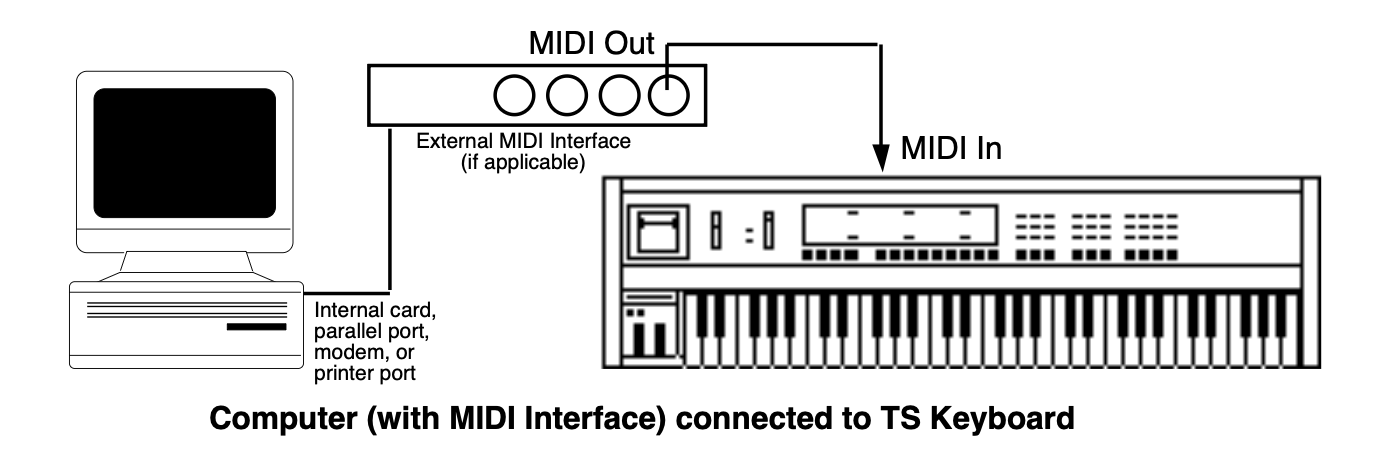
Connecting the TS‑10 keyboard to a
computer (or other General MIDI sequencer)
Power down all electronic devices before making any connections.
Using a MIDI Cable, connect the MIDI In jack of the TS‑10 to the MIDI Out jack of the computer/hardware sequencer/sequence player.
Make sure the proper amplification is connected to the TS‑10, and power on the computer, the TS‑10 keyboard, and the amplification system (in that order).
To Enable General MIDI on the TS‑10
Press the MIDI Control button. The display shows:
On the first MIDI Control sub-page, press the upper middle soft button on the
display to select the GMIDI parameter (it should be underlined).
Press the Up Arrow button to enter General MIDI Mode.
If the sequencer is running, the SEQUENCER MUST BE STOPPED message will be displayed. If the sequencer is
stopped, the SAVE CHANGES? prompt will be displayed (if necessary). Otherwise, the following prompt will be displayed:
4. Pressing the soft button beneath *NO* will leave the TS‑10 system unchanged,
returning you to the first MIDI Control sub-page.
5. Pressing the soft button above *YES* will enable General MIDI Mode. All LEDs will be
off and all buttons (except the Arrow buttons and the soft buttons) will be disabled. The TS‑10 will display the
General MIDI Mode page as follows:
The TS‑10 behaves as though an enlarged 16-track sequence has been selected, and as though the current MIDI
Mode is MULTI. Incoming MIDI will be received on all 16 MIDI channels, to 16 discrete
inbound Track/Channels. The default effect algorithm (46 CHORUS + REVERB 2) will be installed, and all
Tracks/Channels will be routed through the effect.
When you now run the external computer or hardware sequencer, you will hear the proper sounds played from the
TS‑10 as program changes and note/controller data is transmitted to the TS‑10 via the MIDI In jack.
MIDI Out in General MIDI Mode
The TS‑10 keyboard will always play the sound assigned to the currently displayed Track/Channel number. Local playing on the TS‑10 keyboard and controllers will be transmitted via the MIDI Out jack on the displayed MIDI Channel number. This allows you to connect the TS‑10 MIDI Out jack to a MIDI sequencer, hardware sequencer, or other MIDI device.
This feature adds MIDI Controller capability to the TS‑10 while in General MIDI Mode.
TS‑10 General MIDI Parameters
RECV (MIDI Reception)Range: ON or OFF
This parameter is set to receive MIDI data by default (RECV=ON). By changing the RECV
value for each MIDI channel, you can define how many Track/Channels you want to receive data via MIDI.
Setting RECV=OFF will disable reception of MIDI notes, controllers and program changes
on the displayed MIDI channel. Sounds can still be played from the keyboard, and live playing will still transmit
via MIDI on the displayed MIDI channel.
When RECV=OFF, the Track/Channel volume will be set to full on (127), so that your live
playing can use the full dynamic range. Resetting RECV to ON will reset the Track/Channel volume back to the
General MIDI default value of 100.
No matter what the setting of this parameter, a CVP-1 Pedal connected to the Pedal•CV Jack will always control
the volume of the selected Track/Channel.
GM-CHANRange: 01 to 16
This parameter is used to select and view the sounds assigned to each MIDI Channel. When this parameter is
selected, the Data Entry Controls will scroll through all 16 Track/Channels.
GM-CHAN=10 is permanently assigned to play Drum Maps only. When Track/Channel 10 is
selected, the GM-PROG parameter will scroll through the nine available GM/GS Drum Maps.
Playing on the TS‑10 keyboard will always be transmitted on the displayed MIDI channel. If the GM-CHAN value is
changed while a note is held down, local voices will be silenced on the previously selected Track/Channel.
GM-PROGRange: 001 to 128
The GM-PROG (General MIDI Program number) parameter determines which sound will be assigned to each MIDI Channel.
When this parameter is selected, the Data Entry Controls will change which of the 128 General MIDI ROM Sounds is
assigned to the currently displayed Track/Channel. The corresponding Program Change message will be transmitted
via MIDI whenever this parameter is edited.
Program Changes received on MIDI channels 1-9 and 11-16 will assign programs to the 16 Track/Channels from the
128 General MIDI sounds in ROM. MIDI Channel 10 can only access the nine GM/GS Drum Maps, and will receive the
corresponding GS Drum Map Program change value (1=STANDRD-KIT, 9=ROOM-KIT, 17=POWER-KIT, 25=ELCTRNC-KIT,
26=TR-808-KIT, 33=JAZZ-KIT, 41=BRUSH-KIT, 49=ORCH-PERCSN, 128=MT-32-KIT).
The TS‑10 keyboard will always play the sound assigned to the displayed Track/Channel number.
Manually Assigning GM Sounds to Each MIDI Channel
Press the soft button beneath the GM-PROG parameter.
Use the Data Entry Controls to scroll through the different GM Sounds.
The General MIDI Sound names change when you use the Data Entry Controls. These sound names and their associated
GM Program numbers are listed on the General MIDI Sound Map found earlier in this section.
General MIDI “Panic” Button
Some remote MIDI Devices may leave notes and controller values “dangling,” causing Track/Channels to function improperly. The TS‑10 has a solution to this problem — the MIDI “Panic” button. Pressing the upper left soft button above GENERAL MIDI MODE will invoke the GM-PANIC RESET function:
“GM-PANIC RESET” will be momentarily displayed. All TS‑10 and MIDI voices on all 16 Track/Channels will be silenced. The following MIDI messages will be transmitted on all 16 MIDI Channels: All Notes Off, Reset All Controllers, key-ups for all keys down, sustain and sostenuto pedal ups, and controllers will be normalized to the General MIDI default values. Program Changes will be transmitted corresponding to the sounds assigned to each of the 16 Track/Channels.
System and MIDI Control Settings in GM Mode The following System and MIDI Control page parameter settings are installed in General MIDI Mode (see Sections 2 and 3 for information about these parameters). All other parameters are reset to values appropriate for General MIDI reception:
System page TUNE and PITCH-TABLE settings are
retained.
System page TOUCH and VEL-MAX settings are retained.
System page PEDAL is set to VOL.
System page FOOT-SW1-R and SW2-R are set to SUSTAIN.
System page FOOT-SW1-L and SW2-L are set to SOSTENUTO if they were previously set to any value other than *UNUSED*. If they were set to *UNUSED*, they will remain *UNUSED*.
MIDI Control page SYS-EX setting is set to ON.
Exiting General MIDI Mode will restore your original settings.
Disabling General MIDI
To Disable General MIDI
Press the soft button above *EXIT* to exit General MIDI Mode.
The TS‑10 will momentarily show:
The TS‑10 will then return to its previous state. The General MIDI Track/Channel sound assignments will be
preserved in static RAM, even after power-off.
Enabling/Disabling General MIDI with System
Exclusive Messages
General MIDI can also be enabled/disabled using Universal System Exclusive (SysEx) messages:
Turning General MIDI On using SysEx Messages
F0
7E
<Device ID>
09
01
F7
F0 7E
Universal non-real-time SysEx header
<Device ID>
ID of target device (suggest using 7F: Broadcast)
09
sub-ID #1=General MIDI message
01
sub-ID #2=General MIDI On
F7
EOX (end of SysEx)
Turning General MIDI Off using SysEx Messages
F0
7E
<Device ID>
09
02
F7
F0 7E
Universal non-real-time SysEx header
<Device ID>
ID of target device (suggest using 7F: Broadcast)
09
sub-ID #1=General MIDI message
02
sub-ID #2=General MIDI Off
F7
EOX (end of SysEx)
The MIDI Control SYS-EX parameter must be set to SYS-EX=ON
in order to receive Universal SysEx messages.
A Universal SysEx General MIDI On message acts the same as answering *YES* to the
ENTER GENERAL MIDI MODE? prompt, and displays the General
MIDI Mode page. The SysEx message will be ignored if the sequencer is running, or if the system is
already in General MIDI Mode. Sequencer changes will be saved automatically, unless SAVE-CHANGES=NO (on the third Sequencer Control sub-page).
If the TS‑10 is already in General MIDI Mode, a Universal SysEx General MIDI Off message acts the same as
pressing *EXIT* on the General MIDI Mode screen. This exits General MIDI Mode and
returns the TS‑10 to its previous state.
When in General MIDI Mode, the Universal SysEx General MIDI Off message is the only SysEx message that will be
received; all other SysEx messages are ignored.
Sound Canvas MT-32 Mode Program Change Map
The Roland® MT-32 was an early, pre-General MIDI multi-timbral sound
module. It used a different MIDI Program Change Map than General MIDI. The Roland Sound Canvas™ provides an MT-32
Emulation mode, and some Standard MIDI Files are set up to use this. An MT-32 Program Change Map has been included
in the TS‑10 to provide Sound Canvas MT-32 emulation capability.
Roland products use the Bank Select MSB (MIDI Controller 0) to change sound banks; in the Sound Canvas, sound
bank 127 is designated as the MT-32 Emulation mode bank. After the TS‑10 has received a Bank Select value of MSB
127, subsequent MIDI Program Changes on that MIDI channel will select the GM Sounds remapped to the Roland MT-32
Program Change Map, as below:
PROG #
INSTRUMENT
PROG #
INSTRUMENT
PROG #
INSTRUMENT
PROG #
INSTRUMENT
1
GRAND-PIANO
33
NEW-AGE-PAD
65
ACOUSTIC-BS
97
BRASS-SECTN
2
BRITE-PIANO
34
SWEEP-PAD
66
ACOUSTIC-BS
98
VIBRAPHONE
3
ELEC-GRAND
35
CHOIR-AAHS
67
FINGERED-BS
99
VIBRAPHONE
4
ELEC-PIANO2
36
BOWED-GLASS
68
SYNTH-BASS2
100
DULCIMER
5
ELEC-GRAND
37
SOUNDTRACK
69
SLAP-BASS-2
101
TINKLE-BELL
6
ELEC-PIANO1
38
ATMOSPHERE
70
SLAP-BASS-1
102
GLOCKNSPIEL
7
ELEC-PIANO1
39
MUSIC-BOX
71
FRETLESS-BS
103
TUBULR-BELLS
8
HONKY-TONK
40
SOLO-VOICE
72
FRETLESS-BS
104
XYLOPHONE
9
DRWBAR-ORGN
41
POLYSYNTH
73
FLUTE
105
MARIMBA
10
ROCK-ORGAN
42
ICE-RAIN
74
FLUTE
106
KOTO
11
PERC-ORGAN
43
POLYSYNTH
75
PICCOLO
107
BANDONEON
12
DRWBAR-ORGN
44
ECHO-DROPS
76
PICCOLO
108
SHAKUHACHI
13
CHRCH-ORGAN
45
BASS+LEAD
77
RECORDER
109
WHISTLE
14
CHRCH-ORGAN
46
REED-ORGAN
78
PANFLUTE
110
WHISTLE
15
CHRCH-ORGAN
47
GLOCKNSPIEL
79
ALTO-SAX
111
BOTTLE-BLOW
16
ACCORDION
48
SQUARE-WAVE
80
SOPRANO-SAX
112
BOTTLE-BLOW
17
HARPSICHORD
49
STRG-ENSMBL
81
TENOR-SAX
113
TYMPANI
18
HARPSICHORD
50
STRG-ENSMBL
82
BAR-SAX
114
MELODIC-TOM
19
SQUARE-WAVE
51
SYNTH-STR-1
83
CLARINET
115
SYNTH-DRUM
20
CLAVINET
52
PIZZI-STRGS
84
CLARINET
116
SYNTH-DRUM
21
CLAVINET
53
VIOLIN
85
OBOE
117
SYNTH-DRUM
22
CLAVINET
54
VIOLIN
86
ENGLISH-HRN
118
TAIKO-DRUM
23
CELESTA
55
CELLO
87
BASSOON
119
WOODBLOCK
24
CELESTA
56
CELLO
88
HARMONICA
120
REVERSE-CYM
25
SYN-BRASS-1
57
CONTRABASS
89
TRUMPET
121
WOODBLOCK
26
SYN-BRASS-1
58
HARP
90
TRUMPET
122
TINKLE-BELL
27
SYN-BRASS-2
59
HARP
91
TROMBONE
123
ORCH-HIT
28
SYN-BRASS-2
60
NYL-STR-GTR
92
TROMBONE
124
TELEPHONE
29
SYNTH-BASS2
61
STL-STR-GTR
93
FRENCH-HORN
125
BIRD-TWEET
30
HARPSICHORD
62
CLEAN-GUITR
94
FRENCH-HORN
126
BREATHNOISE
31
SAW-WAVE
63
CLEAN-GUITR
95
TUBA
127
CRYSTAL
32
SYNTH-BASS2
64
SITAR
96
BRASS-SECTN
128
BREATHNOISE
After receiving a Bank Select value of MSB 127 on MIDI Channel 10, any subsequent MIDI program changes on MIDI
channel 10 will always select the MT-32 Drum Map.
Transmitting a Bank Select value of 0-126 MSB will return the MIDI channel to normal MIDI program change
reception, selecting sounds from the General MIDI Sound Map as described on the previous page.
MIDI Controller Implementation in General MIDI Mode
When in General MIDI Mode, many of the TS‑10 controllers
function differently than noted in the MIDI Implementation chart, and are described in the chart on the following page.
General MIDI Mode Controller Implementation Chart
Function…
Transmitted
Recognized
Notes
Velocity — Note ON
YES
YES
1 In the TS‑10, a Note Off velocity of 64 is always sent for all keys. 2 The TS‑10 voice architecture does not support Release Velocity.
Velocity — Note OFF
YES1
NO2
Aftertouch — Key
NO
NO
Aftertouch — Channel
NO
NO
Pitch Bender
YES
YES
Defaults to a value of 64 (center).
Controller 0 (Bank Select MSB)
YES
YES
Always transmitted as 00. An MSB value of 127 received will select the MT-32 Program Change Sound Map.
Controller 1 (Mod Wheel)
YES
YES
Defaults to a value of 0.
Controller 4 (Foot Pedal)
NO
NO
Controller 6 (Data Entry MSB)
NO
YES
For recognized Registered Parameters only after controllers 100 & 101 are received.
Controller 7 (Volume)
YES
YES
Defaults to a value of 100. Setting RECV=OFF will default the Track/Channel volume to 127. Devices connected to the Pedal•CV jack will control volume.
Controller 10 (Pan)
NO
YES
Defaults to a value of 64 (center).
Controller 11 (Expression)
NO
YES
Defaults to a value of 127. Expression messages received will be responded to as Mix.
Controller 12 (Effect Mod Foot Switch)
NO
NO
Controller 32 (Bank Select LSB)
YES
NO
Always transmitted as 00.
Controller 38 (Data Entry LSB)
NO
YES
For recognized Registered Parameters only after controllers 100 & 101 are received.
Controller 64 (Sustain)
YES
YES
This defaults to a value of 0. The right foot switch will always function as Sustain.
Controller 66 (Sostenuto)
YES
YES
This defaults to a value of 0. The left foot switch can function as Sostenuto, if a stereo foot switch is connected.
Controller 70 (Sound Variation)
YES
NO
ENSONIQ Patch Selects; values of 00, 20, 40, 7F
Controller 71 (Harmonic Content)
NO
NO
ENSONIQ Timbre.
Controller 72 (Release Time)
NO
YES
Defaults to a value of 64 (center).
Controller 73 (Attack Time)
NO
YES
Defaults to a value of 64 (center).
Controller 74 (Brightness)
NO
YES
Defaults to a value of 64 (center).
Controller 75 (Rate)
NO
YES
Defaults to a value of 64 (center).
Controller 91 (External Effects {Reverb} Depth)
NO
YES
Controls effect bus switching and the FX2 wet/dry mix in the General MIDI effect.
Controller 93 (Chorus Depth)
NO
YES
Controls effect bus switching and the FX1 wet/dry mix in the General MIDI effect.
Controller 100 (Reg Param Select LSB)
NO
YES
Values of 00, 01, and 02.
Controller 101 (Reg Param Select MSB)
NO
NO
Controller 120 (All Sound Off)
NO
YES
Responded to as All Notes Off.
Controller 121 (Reset All Controllers)
YES
YES
Reset Controller messages received will normalize only the controllers supported in General MIDI Mode. It is received independently on each of the 16 General MIDI Track/Channels.
Controller 123 (All Notes Off)
YES
YES
All Notes Off messages received will be responded to regardless of the setting of the ALL-OFF parameter on the MIDI Control page. It is received independently on each of the 16 General MIDI Track/Channels.
Registered Parameters:
These Registered Parameters are received independently on each of the 16 General MIDI Track/Channels.